Does Your Business Qualify For Google’s Local Service Ads? Here’s How To Tell

Google Local Service Ads (LSA) are a pay-per-lead advertising platform that allows local service companies to promote their services on Google.

LSA Google only charges you for qualified calls.

Meaning that if potential customers aren’t actively searching for your service, you don’t pay.

Just like having a GMB profile helps you show up when someone is searching for your offer, LSA ads allow your ideal customers to reach you easier.

That means more calls and more customers to service.

Firstly – Google LSA ads aren’t everywhere.

They’re only available in:

  • United States
  • Canada
  • Germany
  • United Kingdom
  • France
  • Austria
  • Belgium
  • Ireland
  • Italy
  • Netherlands
  • Spain
  • Switzerland

There are also specific regulations depending upon the country.

To name a few:

  • United States: For certain categories like locksmiths and garage door services, advanced verification is required to prevent fraud.
  • Canada: Similar to the U.S., there might be additional verification processes for specific service categories.
  • Germany, United Kingdom, and other European countries: Data protection regulations like GDPR are more stringent, impacting how customer information is handled.
  • France: Specific regulations might apply to trades like plumbing or electrical work, requiring specific certifications or qualifications.

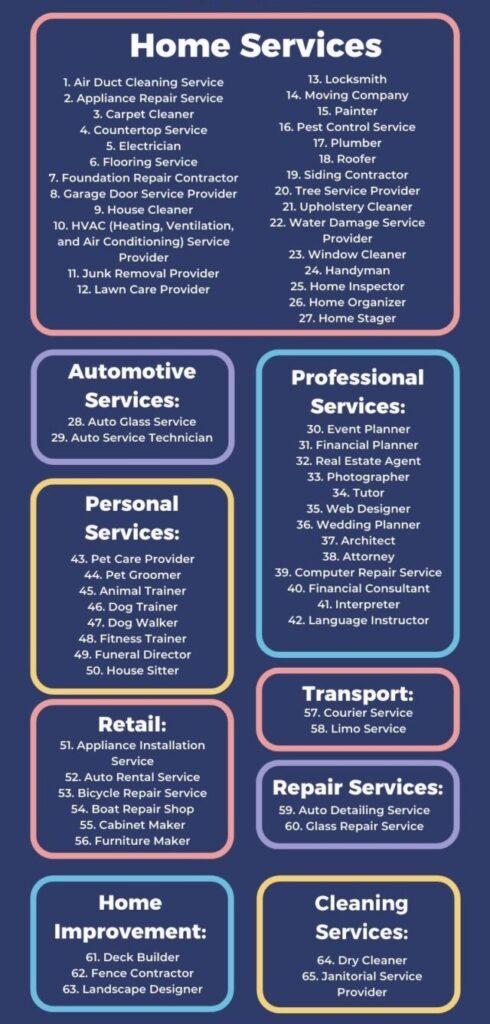
Here Are the Businesses Types That Qualify

Are you in one of these categories?

1. Air Duct Cleaning Service

2. Appliance Repair Service

3. Carpet Cleaner

4. Countertop Service

5. Electrician

6. Flooring Service

7. Foundation Repair Contractor

8. Garage Door Service Provider

9. House Cleaner

10. HVAC (Heating, Ventilation, and Air Conditioning) Service Provider

11. Junk Removal Provider

12. Lawn Care Provider

13. Locksmith

14. Moving Company

15. Painter

16. Pest Control Service

17. Plumber

18. Roofer

19. Siding Contractor

20. Tree Service Provider

21. Upholstery Cleaner

22. Water Damage Service Provider

23. Window Cleaner

24. Handyman

25. Home Inspector

26. Home Organizer

27. Home Stager

Automotive Services

28. Auto Glass Service

29. Auto Service Technician

Professional Services

30. Event Planner

31. Financial Planner

32. Real Estate Agent

33. Photographer

34. Tutor

35. Web Designer

36. Wedding Planner

37. Architect

38. Attorney

39. Computer Repair Service

40. Financial Consultant

41. Interpreter

42. Language Instructor

Personal Services

43. Pet Care Provider

44. Pet Groomer

45. Animal Trainer

46. Dog Trainer

47. Dog Walker

48. Fitness Trainer

49. Funeral Director

50. House Sitter

Retail and Rental Services

51. Appliance Installation Service

52. Auto Rental Service

53. Bicycle Repair Service

54. Boat Repair Shop

55. Cabinet Maker

56. Furniture Maker

Delivery and Transportation Services

57. Courier Service

58. Limo Service

Repair Services

59. Auto Detailing Service

60. Glass Repair Service

Construction and Home Improvement Services

61. Deck Builder

62. Fence Contractor

63. Landscape Designer

Cleaning and Janitorial Services

64. Dry Cleaner

65. Janitorial Service Provider

Google continues to add more every year!

If you fit into any of these categories, here’s how you can get started:

Before running LSA, you need a GMB (Google My Business).

A good example is Anthony’s Lawn Care, which offers tree removal and lawn care services in Bloomington, Indiana.

Before they run LSA, they need a proper GMB (Google My Business) so they can get started.

Now, when you type in “Anthony’s Tree Removal” into Google, they show up.
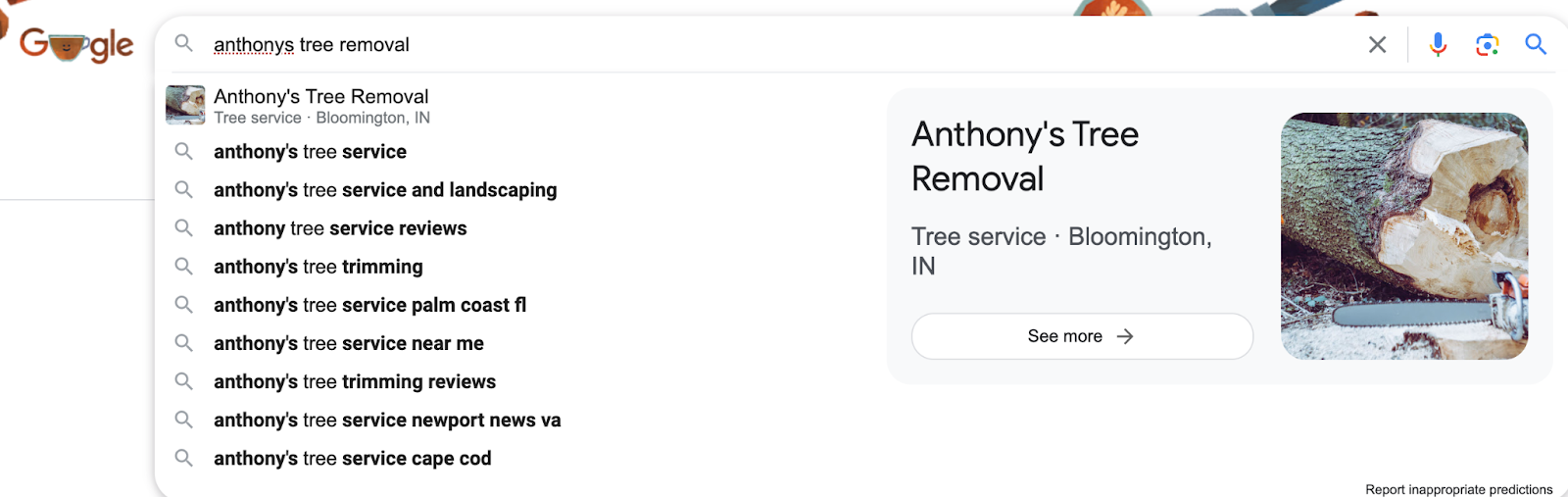
image 58
Anthony’s Tree Removal GMB

Remember to setup your digital plumbing (ads tracking) before you start spending money. We have an entire course on how to do so here.

Here’s How to Setup Your Local Service Ads

Verify Your Business

Ensure your business is eligible for LSA by verifying your business information on Google My Business (GMB). This includes providing accurate business details such as name, address, and phone number. We made a guide on how to do this you can find here.

GMB Optimization

Optimize your GMB profile by adding relevant business information, such as business hours, services offered, and photos. This helps improve your visibility in local searches. Make sure the photos are relevant and actually yours, as Google prioritizes this. This is how you start ranking in the top 3 on Google My Business.

In Anthony’s case, we wanted to make sure all photos listed were from his team’s trucks.
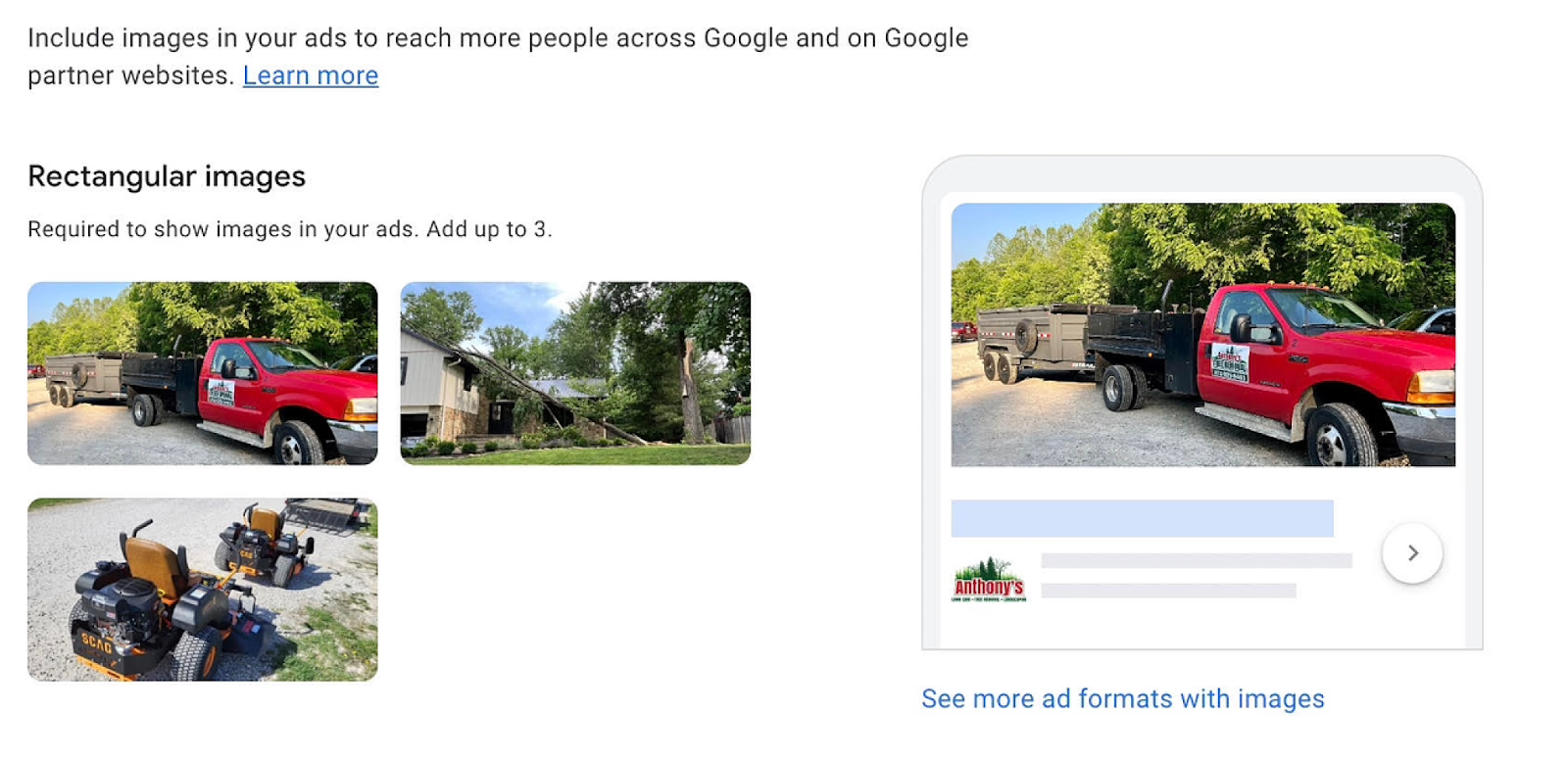
image 59
Anthony’s Lawn Care LSA
Get Verified

Verify your GMB listing to confirm your business details and ensure your business appears on Google Maps and local search results. This part is easy, as you simply need to submit documentation of your business’ existence and answer a few security questions.

Setting Up LSA

Access Local Service Ads

Go to the Local Service Ads website and click on “Get Started.”

Select Your Business Type

Choose the category that best describes your business from the list of eligible categories for LSA.

Set Your Service Area

Define the geographical area where you offer services. You can choose specific cities or regions where you want your ads to appear.

Create Your Profile

Enter your business information, including your business name, address, phone number, and website.

Select Your Services

Maybe you’re an HVAC company that also does electric work. Why only choose one when you can help others, too? Choose the services you offer from the list provided. You can select multiple services that your business provides.

Set Your Budget

Determine your budget for LSA. You can set a weekly budget based on the number of leads you want to receive. Initially, we recommend going with what Google offers.

Set Your Availability

Specify your business hours and when you are available to receive calls or messages from customers.

Verify Your License and Insurance

Upload copies of your license and insurance documents to verify your qualifications for the services you offer.

Review and Submit

Review your information to ensure it’s accurate, then submit your application for review by Google.

Receive Approval

Once your application is reviewed and approved by Google, your LSA campaign will be activated, and your ads will start appearing to potential customers.

The beauty of LSA is visibility of your business, without breaking the bank on expensive SEO or paid ads agencies. Remember to work on your local service pages as well – as this can directly impact your ranking through giving greater authority to Google.

We want to prove to Google that you’re a real business, doing real services, in the area you say you operate in.

And because this is such a common problem with local service businesses, we have a $297 Quick Audit which you can purchase now that can diagnose exactly the issues your business has online.

How I Strengthened a Video Using High Authority Clips

When I opened Dennis Yu’s speaker reel, my first reaction was straightforward: this was already a strong video. The pacing worked, the arc was clear, and the production quality felt polished. It didn’t need a rebuild.

What it did need was a small credibility lift — a few proof-driven moments that made Dennis’s authority clearer. Instead of rebuilding anything, I focused on replacing weaker visuals with real footage that supported the message already in place.

The Editing Approach I Used

As I watched, I looked for places where real proof could replace weaker visuals so the expertise in the reel becomes more visible.

I wasn’t chasing extra b-roll just to fill space. The goal was lightweight, context-matching authority inserts.

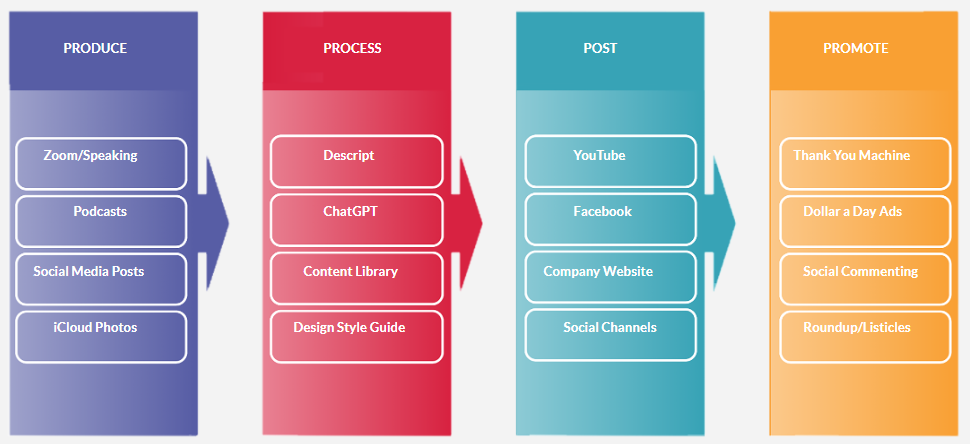
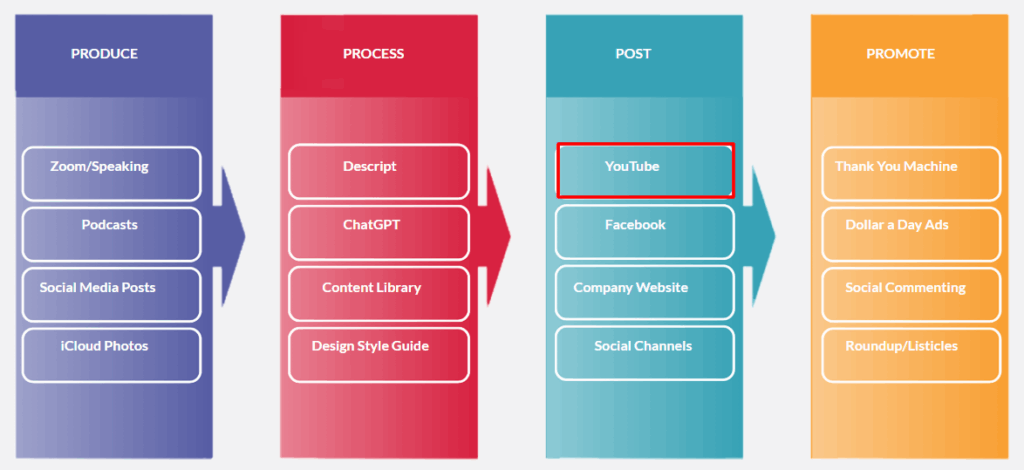
Doing this meant going back into Descript and editing the reel directly, which is exactly the kind of hands-on refinement that’s part of our Content Factory workflow. In this case, the video required small, context-matching authority inserts rather than big structural edits.

How I Selected the Clips (Blitzmetrics 30-Point Authority Rubric)

To make sure every insert increased credibility (not just visual variety), I graded each clip using the Blitzmetrics 30-point authority rubric:

  • Who is saying it (10 points): Is Dennis clearly positioned as the expert?
  • Where is it being said (10 points): Is the platform or venue high-trust (major media, respected institution, credible event)?
  • What is being said (10 points): Is the message expertise-forward and specific (not generic hype)?

Only clips that scored strong across all three categories made the cut.

So I followed two simple placement rules:

Fill Low-Variety Sections With Real Proof

Where the visuals stayed the same for too long, I added short clips that brought both energy and credibility. That way, the reel stays engaging and the viewer keeps seeing Dennis in real authority contexts.

Replace Stock Moments When It Clearly Raised Authority

Where stock visuals were doing the job of “filler,” I replaced select moments with real footage that carried more credibility.

The High-Authority Clips I Added

1. Speaking at Loyola University Chicago (School of Communication)

  • What the Clip Shows: Dennis speaking on a Chicago business/digital webinar hosted through Loyola University Chicago’s School of Communication, seated on a panel alongside other professionals, with a live student audience present.
  • Why It Adds Authority: University setting + professional panel context adds institutional credibility, and the message is expertise-forward (urging students to help small businesses learn online promotional methods and tools).

2. On The Day (DW News) Covering Zuckerberg’s Congressional Hearings

  • What the Clip Shows: Dennis appearing on The Day (DW News) as a Facebook expert, commenting on Mark Zuckerberg’s congressional hearings.
  • Why It Adds Authority: National-level news coverage + expert framing + Facebook-specific analysis creates immediate third-party validation.

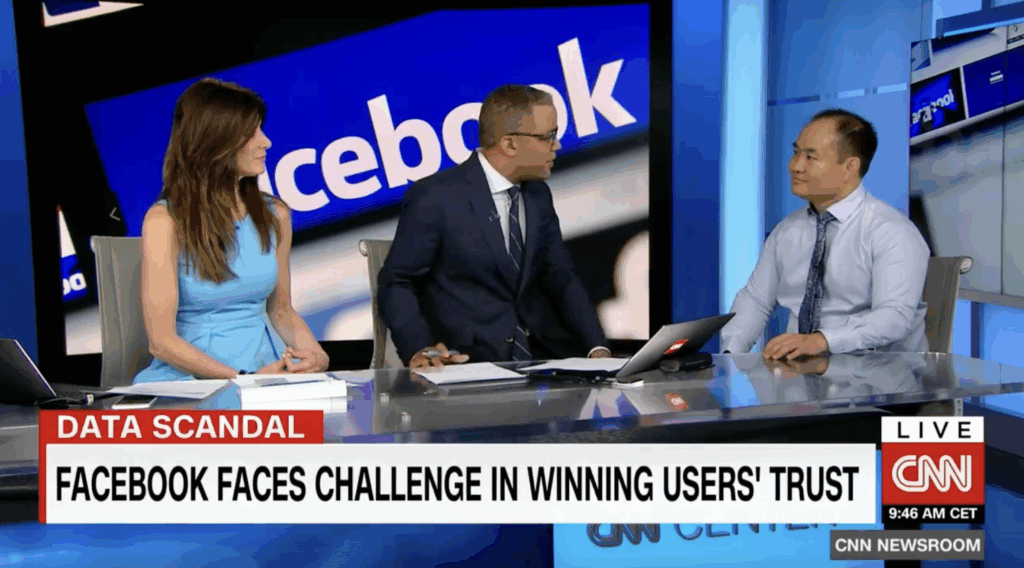
3. On CNN Discussing Facebook Trust Challenges

  • What the Clip Shows: Dennis on CNN discussing how Facebook faces a challenge in winning users’ trust.
  • Why It Adds Authority: Another top-tier news outlet reinforces that he’s sought out to explain Facebook and content-related issues at a professional level.

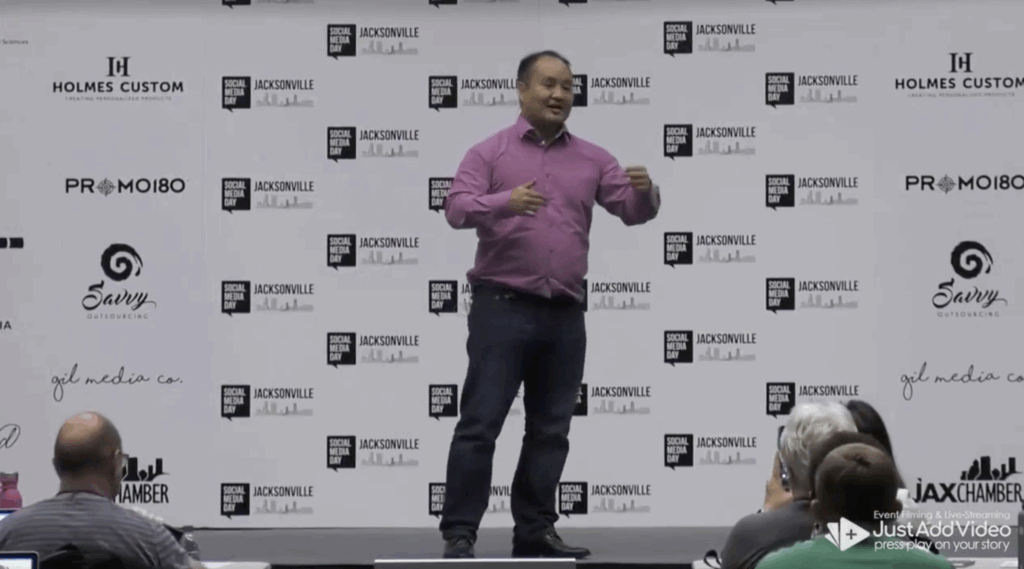
4. Speaking at Social Media Day in Jacksonville

  • What the Clip Shows: Dennis speaking at Social Media Day in Jacksonville in front of a large audience about digital marketing.
  • Why It Adds Authority: Stage authority + crowd size + event credibility signal he’s trusted to teach at scale because he’s an expert in the field.

5. Creating a Video with Jake Paul

  • What the Clip Shows: Dennis and Jake Paul speaking directly to the camera for a video.
  • Why It Adds Authority: Jake Paul’s high public visibility signals that Dennis operates within prominent creator and media circles, reinforcing his credibility in high-visibility digital environments.

6. With Dan Antonelli (Home Service Branding Conversation)

  • What the Clip Shows: Dennis sitting down with Dan Antonelli for a recorded conversation (YouTube/interview style).
  • Why It Adds Authority: Dan Antonelli is the founder and creative director of KickCharge Creative, a leading branding agency in the home services industry, and is widely recognized for helping contractors build strong, differentiated brands. Being positioned in a peer-level conversation with one of the most established names in home service branding reinforces Dennis’s authority as someone operating at the same professional tier.

7. Mentoring Jack Wendt (Mentorship / Coaching)

  • What the Clip Shows: Dennis coaching/mentoring Jack Wendt in a working session context.
  • Why It Adds Authority: Mentorship footage is “authority in action” — it positions Dennis as the teacher/operator guiding other builders. Jack Wendt is a successful AI Apprentice, and a founder of High Rise Influence, reinforcing that Dennis is training real operators, not hypothetical students.

8. Speaking with Marko Sipilä (HVACQuote.ai / CoatingLaunch)

  • What the Clip Shows: Dennis speaking with Marko Sipilä on video, explaining concepts and sharing insights.
  • Why It Adds Authority: Marko is a successful AI Apprentice mentored by Dennis, founder of HVACQuote.ai (helping home service contractors convert leads with instant quotes) and previously scaled CoatingLaunch into a powerhouse in the concrete coatings industry. Training a proven operator reinforces Dennis’s authority as someone successful entrepreneurs learn from.

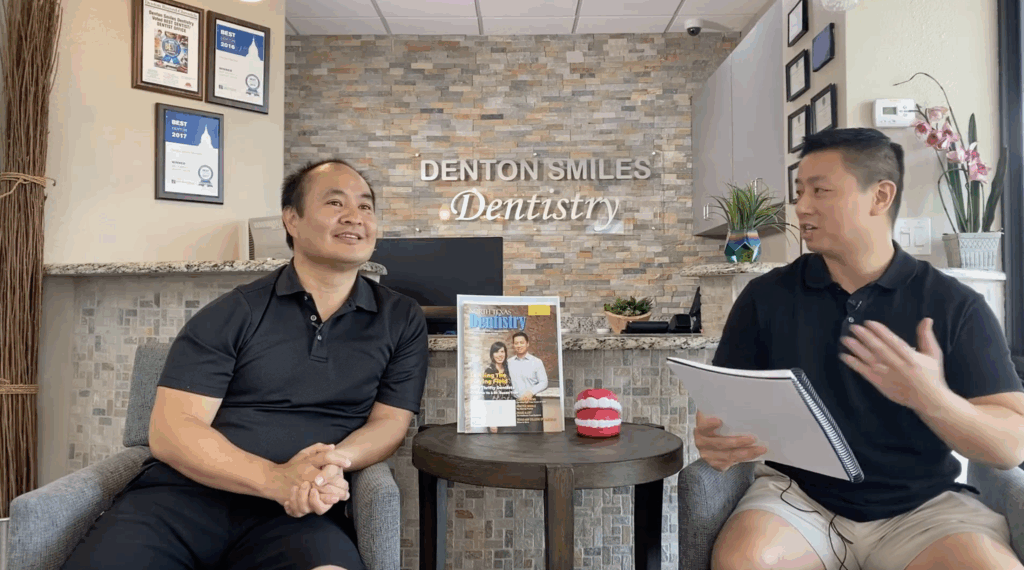
9. With Dr. Glenn Vo at His Dental Practice

  • What the Clip Shows: Dennis on-site with Dr. Glenn Vo inside Denton Smiles Dentistry, speaking in a real business environment.
  • Why It Adds Authority: This is industry-proof — Dennis is working with a recognized dentistry leader and practice owner, reinforcing “trusted by professionals with real businesses.”

10. With Michael Stelzner (Industry Conversation)

  • What the Clip Shows: Dennis in conversation with Michael Stelzner.
  • Why It Adds Authority: Michael Stelzner is the founder of Social Media Examiner, so this adds strong peer/industry credibility and signals Dennis is connected to respected leaders in the social marketing space.

Why These Small Inserts Matter

Edits like these are small individually, but they raise the authority signal of the entire asset. These edits don’t change the story — they reinforce it with clearer visual proof. When the strongest moments are easier to see, every future reuse of the asset performs better.

The original reel already communicated Dennis’s message well. My edits didn’t change the story — they strengthened the evidence behind it.

By adding real-world authority footage in the right places, the reel gains:

  • Higher credibility density
  • Better pacing (fewer flat stretches)
  • Less “generic” feel where stock visuals used to carry the load

The structure stays the same; the evidence on screen is stronger.

What This Demonstrates

Small, precise upgrades like these make an already strong reel feel more grounded and more representative of Dennis’s real-world authority. The structure stays the same, but the presence feels sharper and more credible.

It’s a small edit, but it makes the final piece line up more clearly with how Dennis actually works and shows up in real life.

Page Speed Optimization Is Built Into How We Work

Most agencies treat page speed like a separate service.
We don’t because slow sites quietly kill everything else.

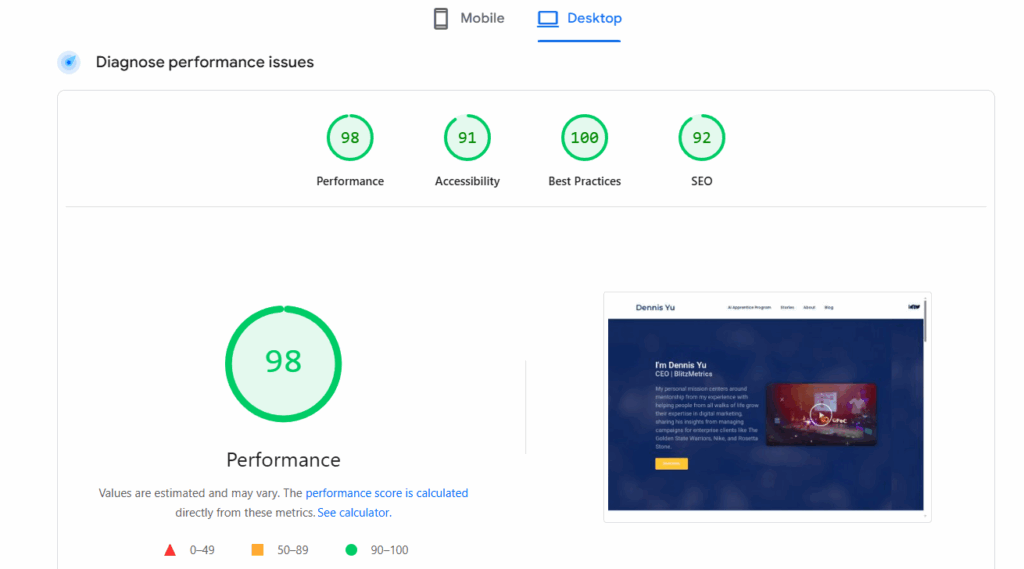
Page speed optimization is part of our core troubleshooting and optimization process, not a random add-on or afterthought. If we’re working with you, we’re already paying attention to how fast (or slow) your site loads and what’s getting in the way.

Why Page Speed Actually Matters

Page speed affects:

  • Whether visitors stick around or bounce.
  • How well your ads convert.
  • How Google evaluates your site quality.
  • Whether forms, tracking, and calls-to-action work reliably.

For local service businesses, a slow site often means:

  • Fewer calls from paid traffic.
  • Lower trust from visitors.
  • Higher ad costs with worse results.

In other words, speed issues bleed results slowly.

Page Speed Is Part of “Digital Plumbing”

We think of page speed as digital plumbing.

You can publish great content, optimize your Google Business Profile, and run ads but if the site underneath is sluggish or unstable, performance suffers across the board.

That’s why page speed is handled alongside:

  • Website QA and cleanup.
  • Tracking and analytics setup.
  • Landing pages for ads.
  • SEO and content enhancements.

It’s foundational.

What We Actually Do

Depending on the site, our work may include:

  • Hosting and server-level checks.
  • Caching and compression configuration.
  • Image and asset optimization.
  • Cleaning up bloated themes or unused plugins.
  • Fixing render-blocking scripts.
  • Reducing redundant tracking tools.
  • Ensuring WordPress updates don’t break performance.

Sometimes the fix is simple.
Sometimes we’re untangling years of technical debt.

Either way, it’s handled methodically.

How Page Speed Fits Into the Bigger System

Page speed supports everything else we do:

  • Google Business Profile optimization.
  • Content and blog enhancements.
  • Paid traffic and landing pages.
  • Tracking, attribution, and reporting.

A fast site doesn’t guarantee success, but a slow one quietly sabotages it.

The Bottom Line

If we are working with you, page speed is already on our radar.

We don’t hype it.
We don’t oversell it.
We just fix what slows you down so the rest of the system can do its job.

That’s how you get fewer technical problems and more calls that actually turn into customers.

How Our YouTube Optimization and Boosting Process Works

How the Boosting & Access-Onboarding Process Works

When we take on a YouTube channel, especially one with solid content but limited traction, the first thing we do is get inside the machine.

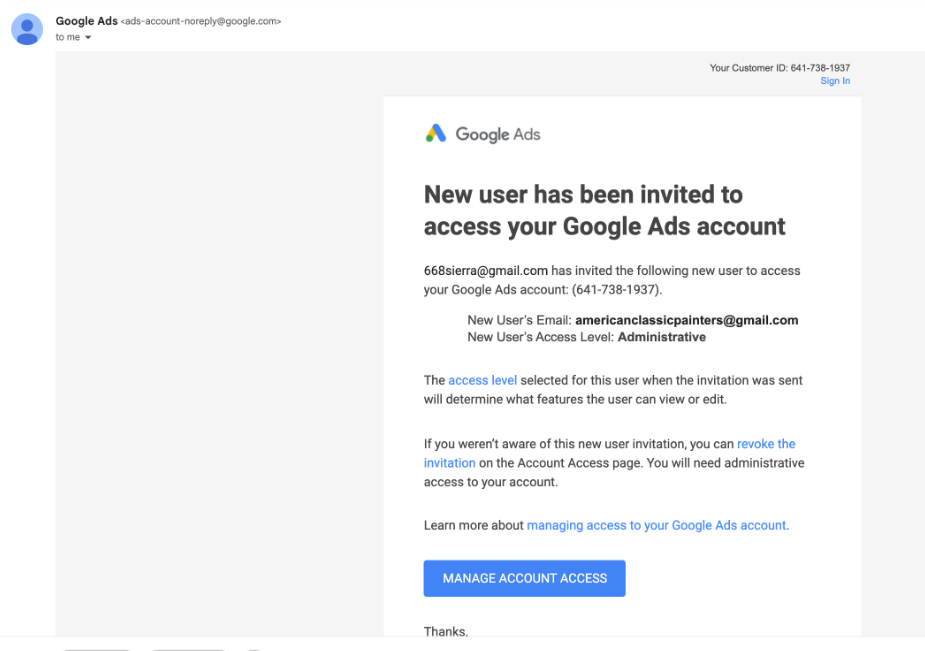
Below is the exact process we follow once you add us as managers to your channel and connect the channel to our Google Ads account.

Gaining Manager Access

Once you add us as a channel manager, we can:

  • Clean up the channel structure.
  • Fix metadata and playlists.
  • Create geo-relevant signals Google actually recognizes.
  • Connect the channel to Google Ads.
  • And most importantly, start boosting videos.

Without manager access, none of that happens. We can advise, but we can’t execute.

Establishing the Baseline

Before touching anything, we benchmark the channel.

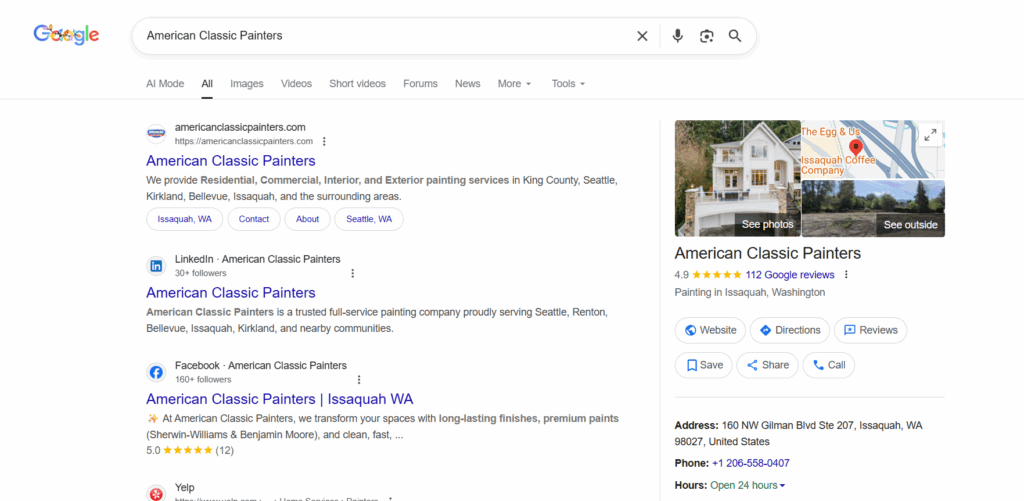
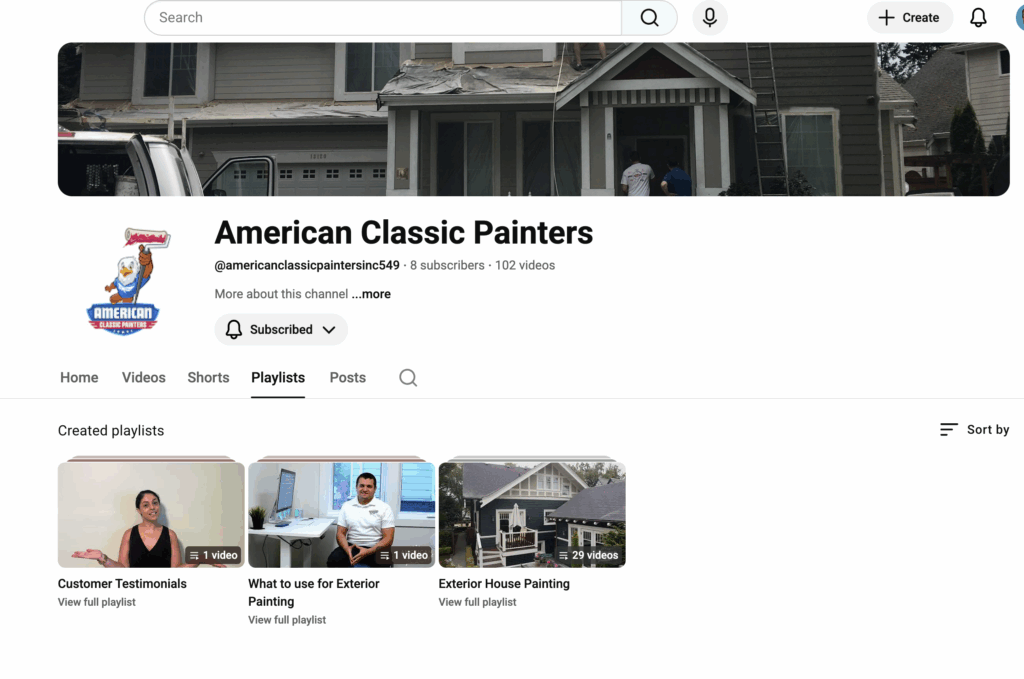
In the case of American Classic Painters:

  • 102 videos were jammed into only 3 playlists.
How the Boosting & Access-Onboarding Process Works

  • Titles, descriptions, and end cards had no geographic signals.
How the Boosting & Access-Onboarding Process Works

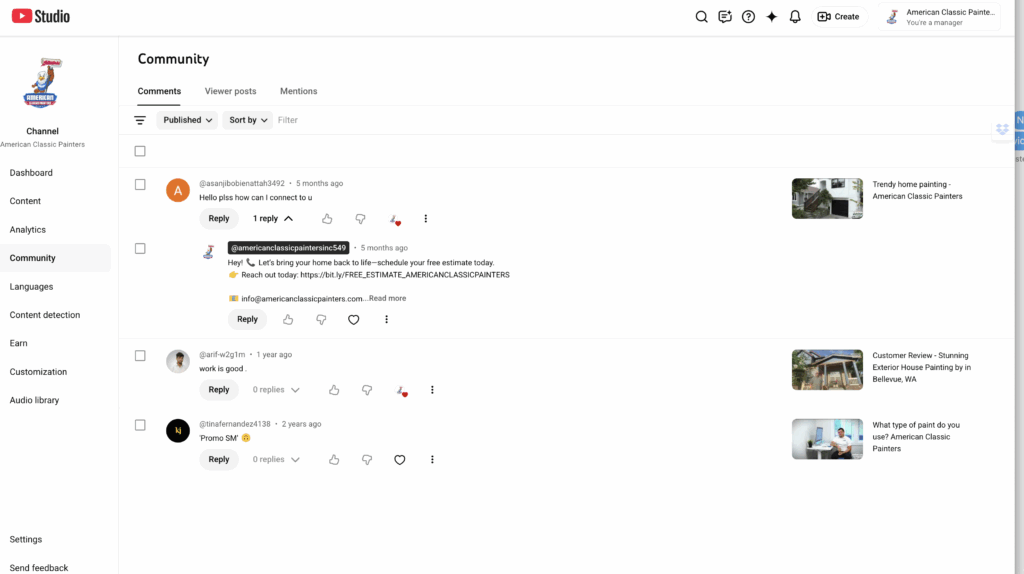
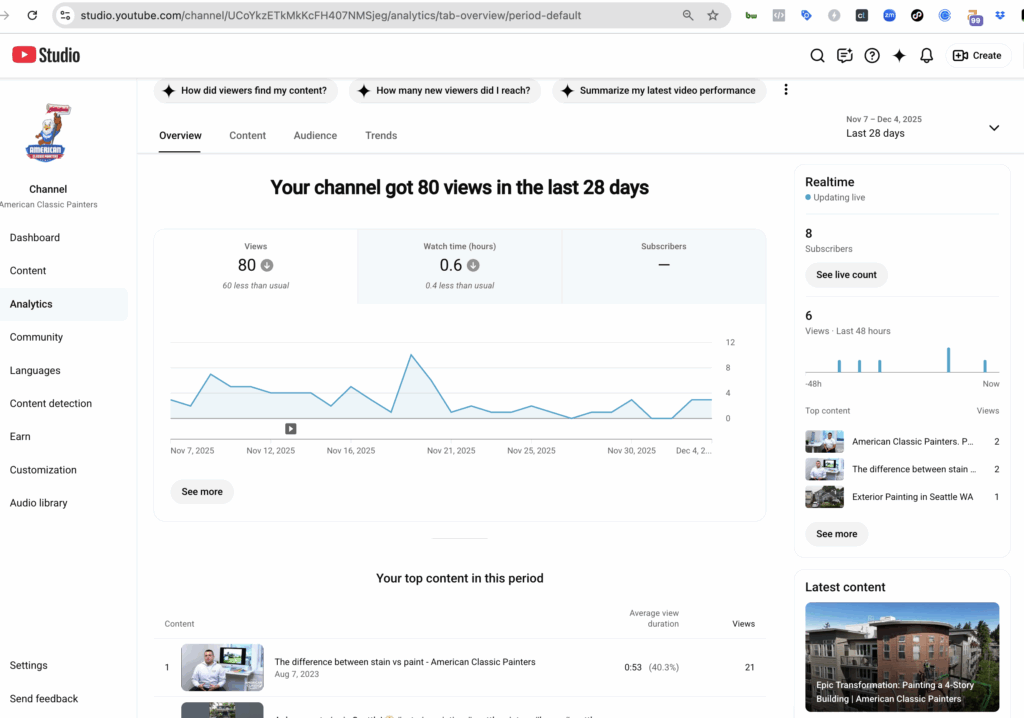
  • Engagement was near zero, because there was no traffic.

  • Which meant the videos couldn’t rank, because YouTube had nothing to learn from.

How the Boosting & Access-Onboarding Process Works

Classic chicken-and-egg problem:
No traffic → no engagement → no distribution → no growth.

Boosting is how we break the loop.

Channel Optimization

While boosting gives us initial momentum, optimization is what lets the channel grow organically after the paid push.

Our optimization process includes:

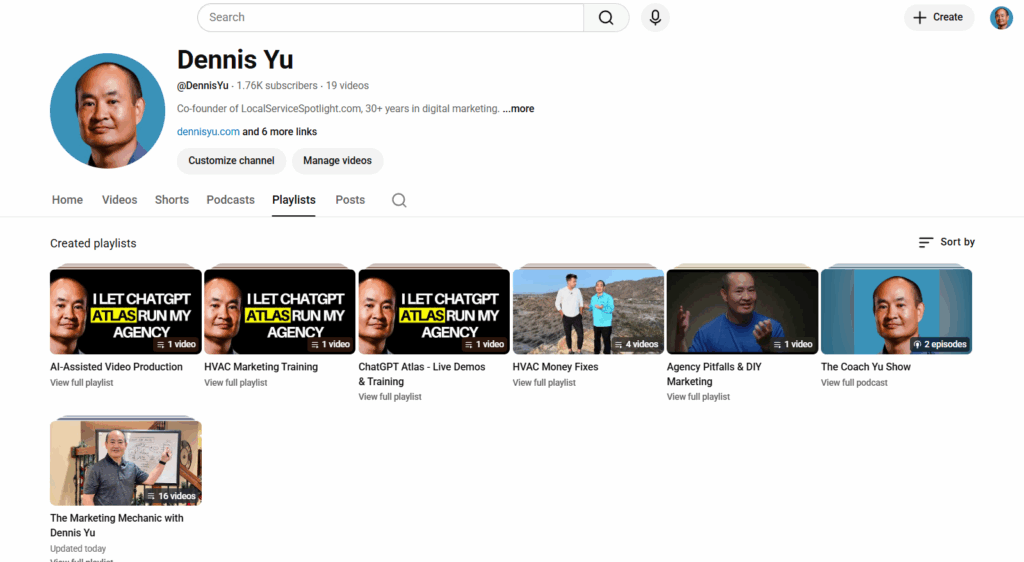
Creating properly themed playlists

Playlists should follow your “topic wheel,” not be a dumping ground of everything you’ve ever uploaded.

Playlists of Dennis Yu‘s YouTube channel

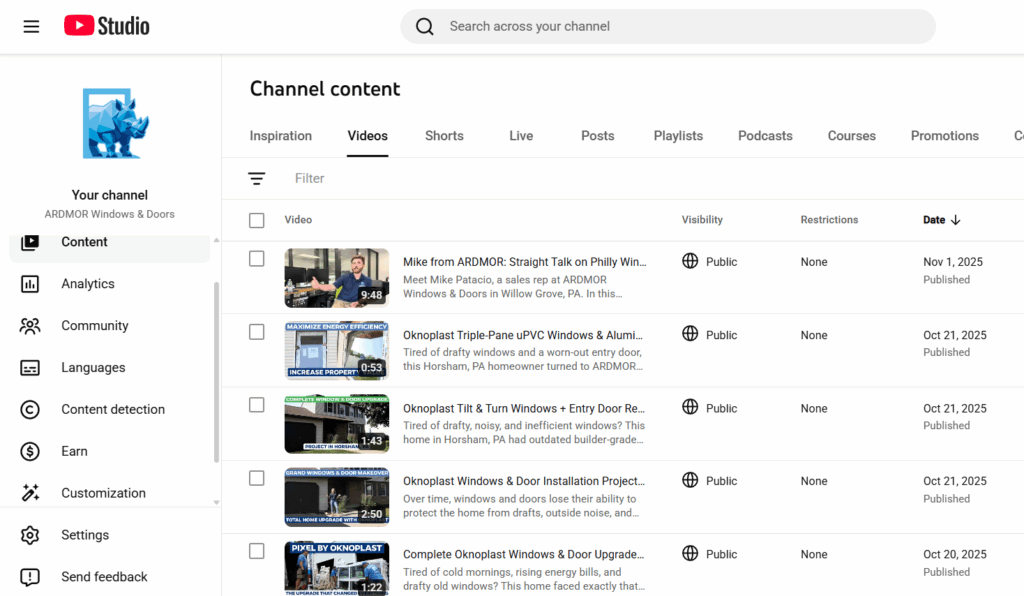
Adding geo-relevant cues

City + service data in titles, descriptions, and end cards tell YouTube:
“This content is for people in this location searching for this type of provider.”

YouTube videos of ARDMOR Windows & Doors

Improving metadata that YouTube actually reads

This includes:

  • Tags.
  • Captions.
  • Default upload templates.
  • Thumbnails.
  • Cards & endscreens.

None of this is glamorous, but it works. It’s the SEO of video.

Optimization is ongoing, not a one-time sweep; just like tuning a car before every race.

Brady Sticker‘s YouTube channel

Boosting YouTube Videos

If the client wants us to run direct boosting from our side, they can fund it at Power Hour.

What we do with the boost:

Promote selected videos

We intentionally choose:

  • Videos with strong messaging.
  • Clear calls to action.
  • Relevance to your local market.
  • Content that best represents you as the expert.

We don’t boost everything; only what deserves amplification.

Build remarketing audiences

Most channels start with zero audience data.

Boosting gives us:

  • Viewers.
  • Clickers.
  • Engagers.
  • People who hit 25%, 50%, 75%, 100% watch time.

Those signals allow us to create remarketing pools we later use across platforms.

Train the algorithm

By forcing initial traffic, we teach YouTube:

  • Who watches to completion.
  • Who skips.
  • What geographic areas respond.
  • What interest profiles match your content.

This is crucial, because YouTube’s algorithm is basically a giant “lookalike engine.”
It can’t find your perfect viewers until it sees who your actual viewers are.

Weekly Reporting & Iteration

As boosting runs, we monitor:

  • Cost per view.
  • Average view duration.
  • Viewer retention at key moments.
  • Geo performance.
  • Playlist contribution.
  • Watch time growth.
  • Rising vs. falling videos.

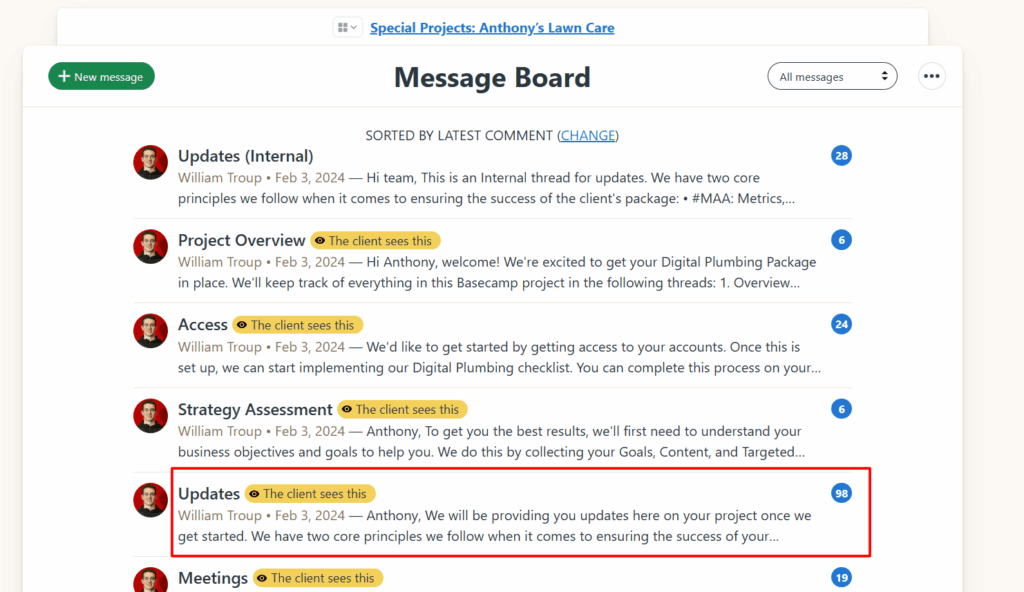
The project manager posts MAA in the appropriate updates thread:

Anthony Hilb‘s Basecamp project

What Happens After the Boost

The boost gives us:

  • Data.
  • Momentum.
  • An initial audience.
  • Watch time.
  • Engagement signals.
  • A trained algorithm.

From there, the channel becomes far easier to grow organically.

We keep optimizing thumbnails, playlists, descriptions, and continue adding geo-relevant content.

This is a “build authority and traffic predictably over time” strategy.

Why You Should Add a 301 Redirect Instead of Just Trashing an Article

When you find an empty, outdated, or broken article on your site, your first instinct might be to delete it. But before you send it to the trash, pause. If that URL has ever been published, indexed, or linked, you’re throwing away valuable SEO equity.

What happens when you delete a Page

When you hit “Trash,” WordPress sends that URL into oblivion. Anyone visiting the old link, whether from Google, social media, or someone’s bookmark, will now get a 404 (Page Not Found) error.

That means:

  • You lose all the SEO authority that page built up over time.
  • Users hit a dead end, which kills trust and increases bounce rates.
  • Google eventually drops it from the index, which can weaken your site’s overall structure.

Why a 301 redirect is the smart move

A 301 redirect tells search engines and browsers, “This page has permanently moved.”

It passes nearly all of the link equity from the old URL to the new one keeping your SEO value intact.

It’s also good UX. Instead of landing on an error page, visitors are automatically taken to a relevant page that still helps them.

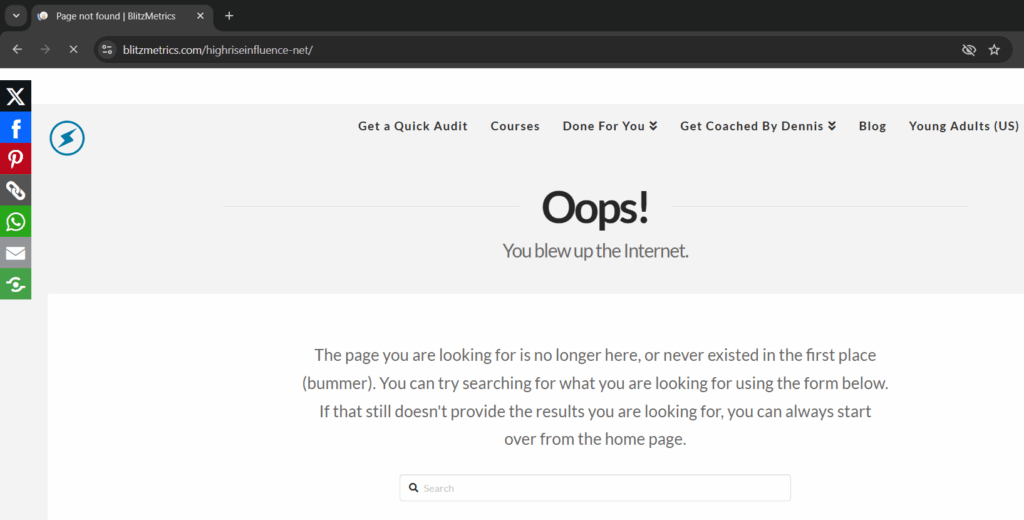
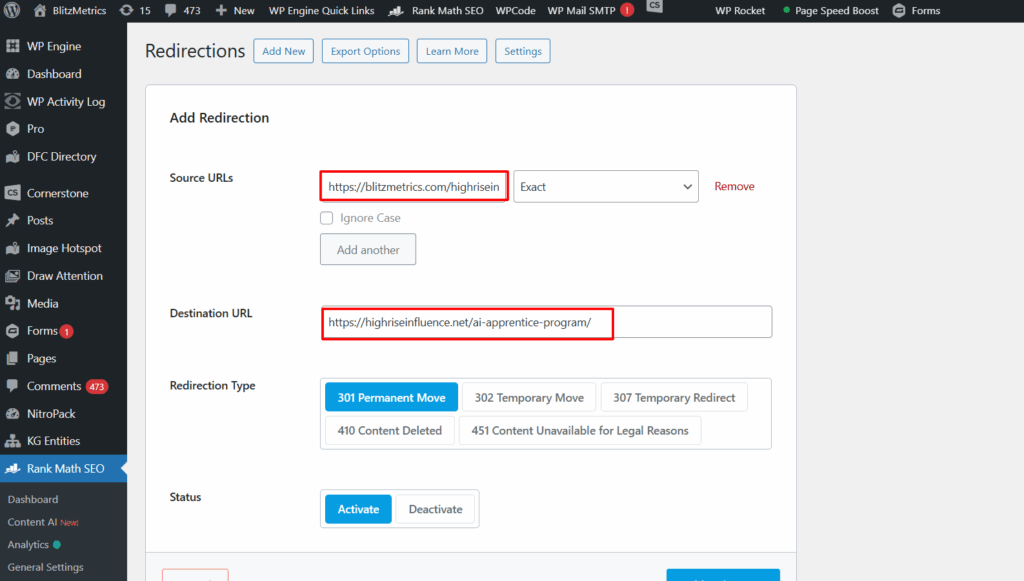
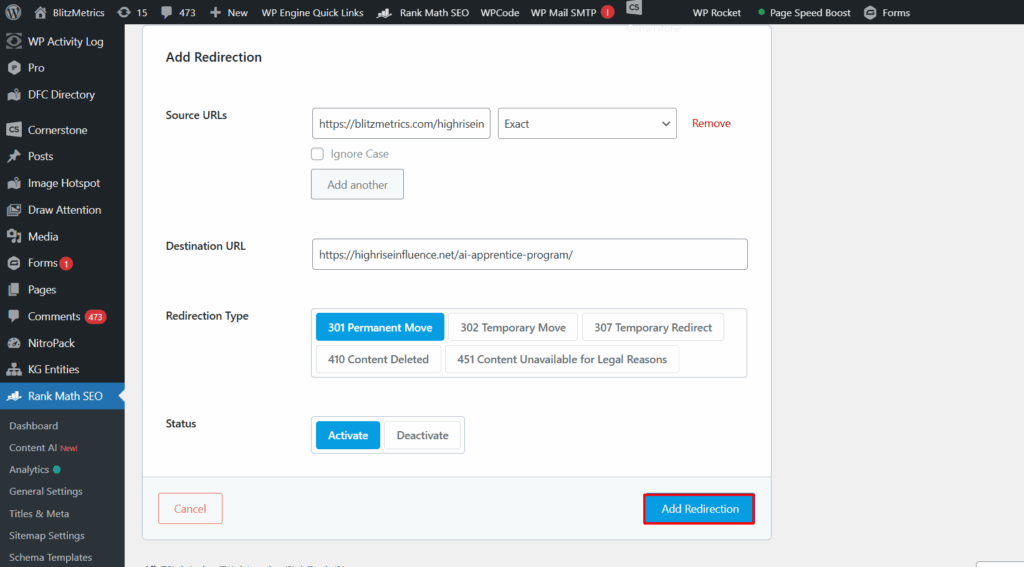
In the case of the article https://blitzmetrics.com/highriseinfluence-net/, which was empty, we didn’t just delete it. We redirected it to the AI Apprentice program page, a live, relevant destination that keeps traffic flowing instead of wasting it.

When to use a 301 redirect

Use a 301 redirect whenever:

  • The page is outdated or replaced with a new version.
  • You’ve merged multiple articles into one.
  • The URL structure changes (e.g., rebranding, domain migration).
  • The content no longer exists but there’s a related topic that fits.

How to add a 301 redirect

If you’re on WordPress:

1. Use a plugin like Rank Math, Redirection, or Yoast SEO Premium.

2. In the plugin’s Redirects section, enter:

— Source URL: the old page (e.g., `/highriseinfluence-net/`)

— Target URL: where you want it to go (e.g., `/ai-apprentice-program/`)

3. Save the redirect and test it.

That’s it, your link equity and user experience are safe.

Final thought

Never delete a page that’s been published without adding a 301 redirect first. Think of it like forwarding your mail when you move; it’s common sense, it keeps people from getting lost, and it preserves everything you’ve built.

Not Sure About College Yet? Start Building Skills That Give You Options

This video was filmed in Las Vegas during a conference weekend. Four of us sat down—young adults who are actually doing the work every day—to talk through a question we hear constantly: “Should I go to college, or should I do something else first?”

Our answers aren’t identical because our paths haven’t been identical. That’s the point. There isn’t one correct route. There is a smart first move, though: build skills that travel with you.

We All Took Different Paths—and We’re Still Moving Forward

Here’s what that looks like in real life for the four of us in this video:

  • Jack Wendt didn’t go to college.
  • Sam is in college right now.
  • I plan to go to college.
  • Luke went to college but didn’t finish.

Same table, same conversation, different decisions. Nobody is “behind.” Nobody is locked out of a good career. What separates people early isn’t the label of student or non‑student. It’s whether they’re gaining real ability to create value.

What We Teach Is Practical and Transferable

At High Rise Academy, we work directly with local service businesses, so the training stays grounded in what actually drives growth. The goal isn’t to memorize concepts. It’s to learn how to produce outcomes.

Here’s what apprentices practice in the program:

  • Using modern tools to speed up research, writing, and creative production.
  • Turning customer reviews and job photos into content people respond to.
  • Improving websites so visitors turn into calls and booked jobs.
  • Running simple ad campaigns and tracking what’s working.
  • Communicating with business owners and following through on deadlines.
  • Building repeatable workflows such as the content factory so that results aren’t random.

These skills transfer into almost any lane—whether you end up in business, tech, sales, operations, or entrepreneurship.

Real Ways People Use the Program

People come into High Rise Academy with different starting points, and the same skills end up helping them in different ways. That’s because the Academy sits in the middle of a two-sided market: on one side are local service businesses that need real marketing help, and on the other side are young adults who need real experience. When both sides show up, everybody wins—businesses get growth work done, and apprentices get reps that actually matter.

Some apprentices work directly with local service businesses through the Academy. They learn our systems, build campaigns, and get daily reps on real client work.

Others start close to home by running marketing for their parents’ local service businesses. They’ll fix a website, post content, set up ads, and organize reviews—then see what happens when consistent marketing meets real operations.

Some take that family-business experience and turn it into outside work. That step—from “helping at home” to “helping clients”—is a common bridge.

A good example we talked about is Ethan Murphy. He began by doing marketing for his parents, then applied the same playbook to the fencing niche. Within a few months he had picked up five or six fencing clients and was delivering results fast. He’s basically building a niche agency around that skill set.

Those are four distinct, real outcomes from the same skill set. Same training, different applications—because the two sides of the market keep feeding each other: businesses create the problems worth solving, and apprentices build the skills by solving them.

Why Skills First Makes the College Decision Easier

College can be a good move for some people. It can also be the wrong move for others at a given time.

The problem is that most people are asked to choose before they’ve done enough real work to know what they want.

Skills fix that.

When you can produce useful work:

  • You have proof of what you’re good at.
  • You can earn while you learn.
  • You can switch directions without starting from zero.
  • You walk into college (if you go) with context instead of guessing.

That’s why we keep saying this program can be an internship, a first job, a career start, or a way to level up a family business. It’s not a narrow track. It’s a skill-builder.

What To Do Next If You’re Still Unsure

If you’re undecided about college, that’s normal. Most people are being asked to choose before they’ve done enough real work to know what fits. Getting real reps first makes the decision a lot clearer.

If you want to learn these skills in a hands-on way, then the High Rise Academy might be right for you. You’ll work on real local service business campaigns, learn modern marketing systems, and build a portfolio that makes your next decision easier.

Why You Should Never Use Stock Art

We have a chronic problem in our materials, and it’s not subtle.
It’s stock art.

You know exactly the species:

  • Stick-figure crowds that look like they escaped from ClipArt rehab.
  • Fake-smiling business people who have clearly never run an actual business.
  • Random gradients someone tossed in because “the page needed something.”

Stock art isn’t just inauthentic; half the time it’s not even relevant. It’s visual filler. And despite calling it out in threads, updating training, and telling people loudly not to use it, stock art keeps sneaking back in like a raccoon raiding the dumpster behind Applebee’s.

But there’s a deeper issue. And it has nothing to do with design skills.

The real problem: No experience = no expertise

Stock art shows up when someone doesn’t actually understand what they’re trying to communicate.

It’s easier to paste a cute icon than it is to:

  • Map out a funnel from a real campaign.
  • Show the real metrics.
  • Pull real screenshots.
  • Explain the real logic behind the system.

And this is where we run headfirst into EEAT, specifically the first E: Experience.

Google rewards content grounded in firsthand proof. So do real users. When you throw in stock art, you’re broadcasting the opposite: “I don’t have anything real to show you.”

Nothing demolishes credibility faster.

Stock art = evidence of no actual doing

Here’s the pattern we see all the time:

We talk about performance benchmarks.
We break down funnels.
We show TikTok metrics.
We emphasize real examples, real screenshots, real campaigns.

Then someone uploads… a blue stick-figure holding hands with 11 of its closest stick-friends.

Why?

Because stock art gives the illusion of completion without demonstrating any experience.

And without real experience, you don’t have expertise. Without expertise, you can’t teach. That’s the whole point of Learn → Do → Teach. The order matters.

What belongs in our materials instead

Only things that reflect real work done by real practitioners:

  • Authentic screenshots.

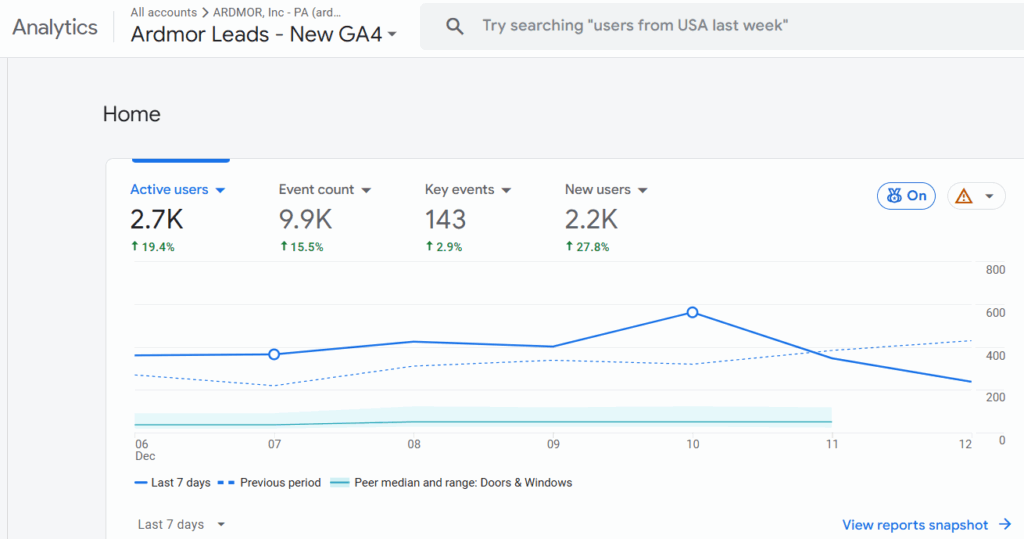
Andrii Melnyk (ARDMOR Windows & Doors)

  • Real campaigns.
  • Real dashboards.
  • Real funnels drawn from real data.
  • Simple diagrams that match how the system actually works.

These aren’t decorations. They’re evidence.
Evidence of experience. Evidence of understanding. Evidence of actual EEAT.

A simple rule:

If you wouldn’t show it to a paying client, don’t put it in our training.

Why stock art hurts our brand

Let’s be blunt:

❌ It destroys authenticity.

People can smell generic content a mile away. It instantly lowers trust.

❌ It’s usually irrelevant.

Stock art rarely reinforces a concept. It’s just visual noise.

❌ It signals “I don’t understand this.”

This is the killer. When someone fills space instead of providing clarity, the entire training degrades.

❌ It hurts our EEAT.

Google prefers content with real images/video because it demonstrates firsthand experience.
Stock art does the exact opposite.

❌ It links us to low-quality sites.

Right-click search any stock image and you’ll find it on:

  • crypto scams.
  • random spam blogs.
  • some guy’s homemade “entrepreneur motivation” poster from 2012.

Not the company we want to keep.

How we fix this, permanently

The answer isn’t “find better art.”

The answer is do real work, then document it.

If you’re contributing to training, you’re not a decorator. You’re a practitioner teaching from experience. That means:

  • If you can’t explain the metric, don’t include an image
  • If you don’t know where something belongs in the funnel, ask
  • If you’re unsure whether an image fits, it doesn’t
  • If you feel tempted to use stock art… shut the laptop, take a breath, and delete it

Our materials must come from actual experience — not Shutterstock and not AI-generated Web 1.5 clip art.

The bottom line

Stock art has no place in materials meant to build trust, teach systems, or prove competence.

Use real images.
Use real video.
Use real proofs of work.

Not because it “looks nicer.”
Because it satisfies the first E in EEAT — Experience.
Without that, nothing else matters.

Our brand deserves better.
Our training deserves better.
And the people learning from us deserve materials that are accurate, authentic, and grounded in real experience.

Let’s publish content so real, so credible, and so obviously practitioner-driven…
that nobody ever reaches for stock art again.

Congrats — You Just Earned a High Rise Influence Link

If you’ve landed on this page, it’s because we featured you in one of our articles which means you just picked up a high-quality, contextually relevant backlink from HighriseInfluence.net.

Nice work. Most sites never get even one legit mention.

About our site (and why this link matters)

HighriseInfluence.net is still growing (our Domain Rating is DR7 at the moment) but don’t let the number fool you.

In SEO, context and relevance often beat raw power.

  • Our site sits squarely in the personal branding, authority building, and reputation growth space.
  • We publish content tied to entrepreneurs, local service pros, agencies, and thought leaders.
  • Every outbound link we give is intentional and topic-aligned, not random spam or profile links.

That means the link pointing to you is:

✔ Do-follow.
✔ Clean and natural.
✔ Surrounded by relevant content.
✔ Coming from a real brand with real activity.

And yes, Google notices that.

Why a DR7 link still helps

Would you rather get a DR63 backlink? Sure. Who wouldn’t?

But here’s the reality most SEO “gurus” won’t tell you:

A single contextually aligned link often moves rankings more than a higher-DR link that’s off-topic.

Your new link from Highrise Influence passes:

  • Topical authority.
  • Entity association (your name/business connected to ours).
  • Relevance (Google loves niche-aligned sources).
  • Trust signals from a legitimate business publishing original content.

These help your site’s SEO no matter what your current DR is.

How to see the impact

If you use tools like Ahrefs, SEMrush, or MOZ, you’ll notice:

  • New referring domain.
  • Increased backlink count.
  • Potential movement in your keyword rankings over the next few weeks.
  • Stronger entity signals for your brand.

If your site is under DR20, every high-quality backlink is a big deal. The early ones move the needle the most.

Share the win

You earned a legitimate feature; don’t keep it quiet.

Post on your social channels, tell your audience you were mentioned, and link back to the article. Not only does it help your SEO even more, it amplifies your authority.

Keep rising

Congrats again on being featured.

Keep building, keep showing up, and keep stacking wins like this.

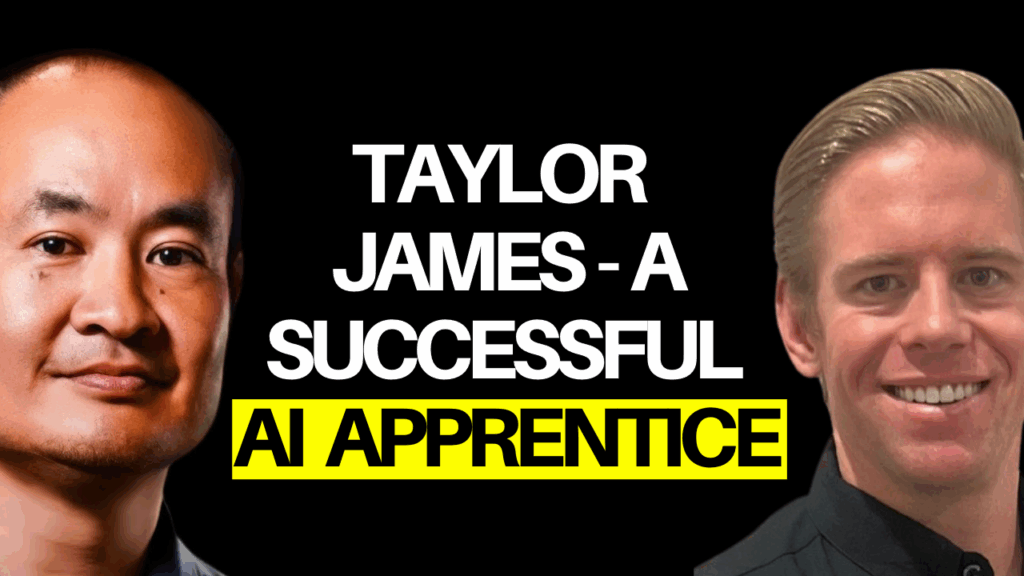
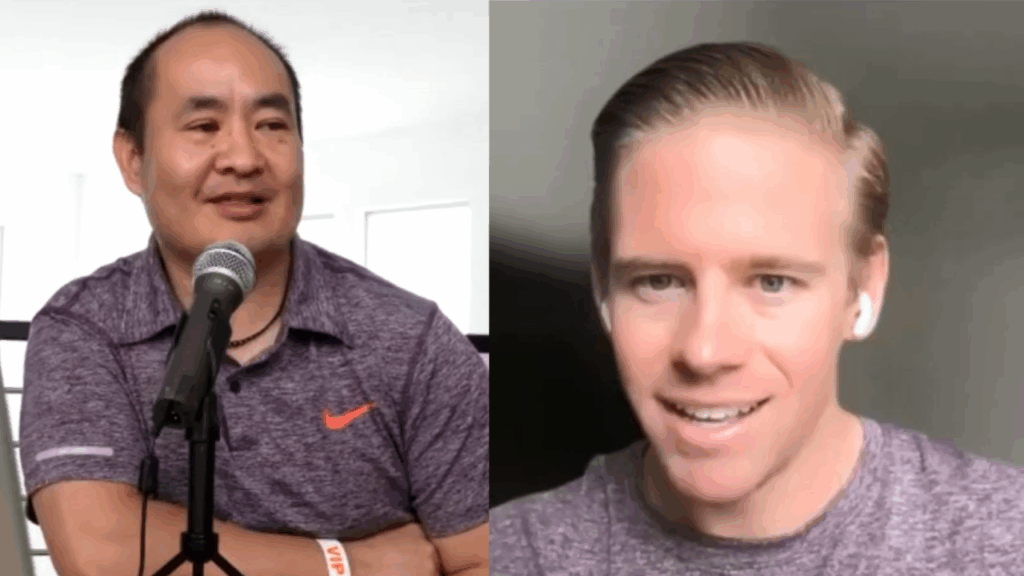
Taylor James: The AI Apprentice Who Took Charge and Stopped Getting Played by “SEO Experts”

There’s a moment in every entrepreneur’s life when the lightbulb flips on, and they realize, “Hold up, I’m paying for what, exactly?”
For Taylor James, owner of Dumpster Dogs in Austin, that moment hit like a 30-yard roll-off container landing on a driveway at 7 a.m.

For six months, Taylor had been dropping $750 a month on “SEO services” from the software company powering his website and CRM. They told him the same thing every shady agency tells every small business owner:

“Just give us six months. You’ll rank.”

Fast-forward six months:
Zero ranking. Zero results. Zero transparency.
But plenty of excuses.

Taylor didn’t get angry.
Taylor got educated.

And that, right there, is exactly what defines a successful AI Apprentice.

The Turning Point: When Data Replaces Hope

When Taylor hopped on a call and opened his actual analytics, the truth came out immediately:

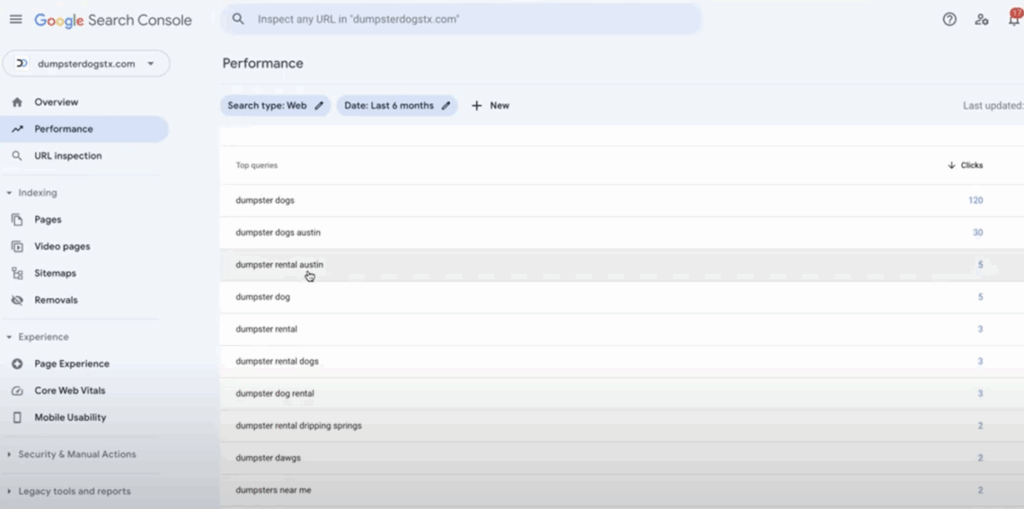
  • All his organic traffic was coming from people searching his own brand name; meaning HE created the demand, not the SEO agency.
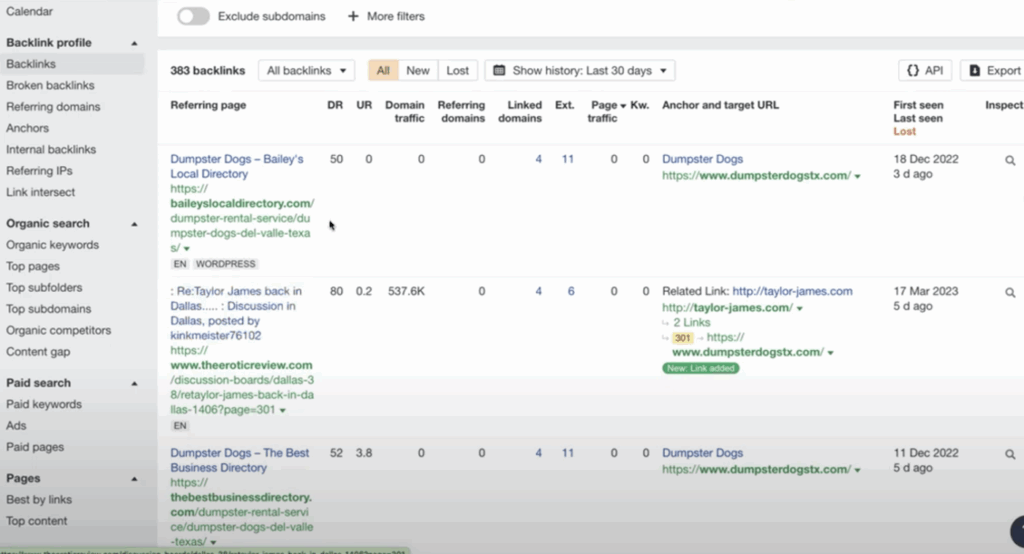
  • His backlink profile was stuffed with garbage: adult sites, spammy directories, fake citation networks, and Fiverr-level nonsense that Google ignores (or penalizes).
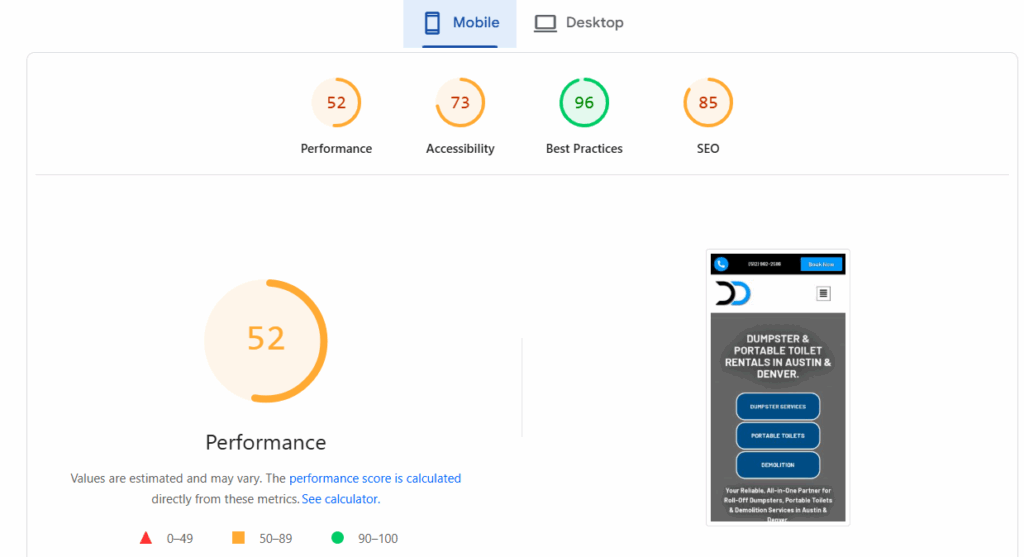
  • His website was slow on mobile (a 52 score, yikes).
  • His site structure was thin, duplicated, and clearly auto-generated.
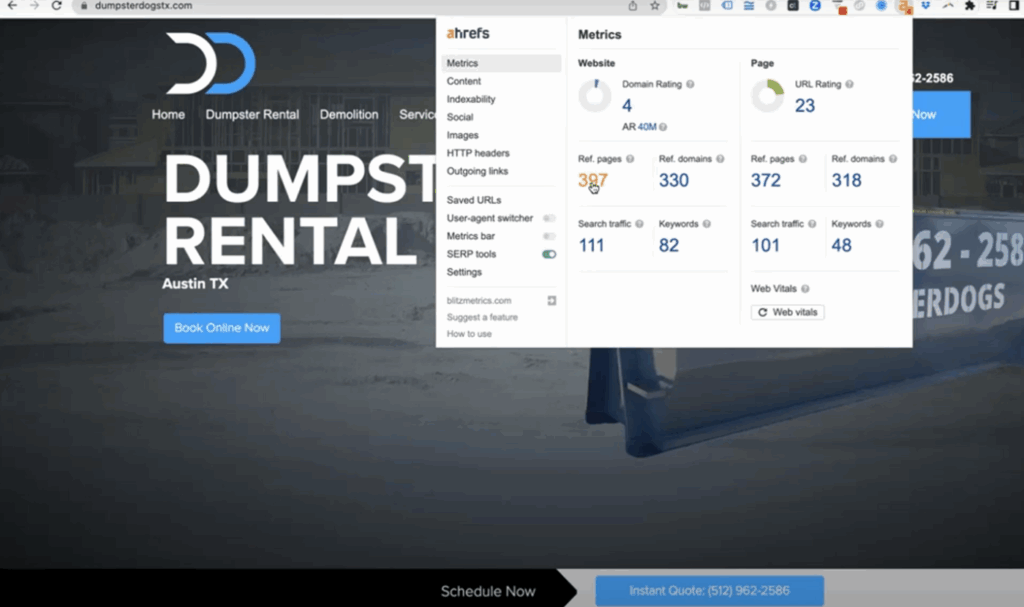
  • And his domain rating was 4.
    That’s “garage sale” level SEO juice.

Taylor realized quickly:
He wasn’t lazy.
He wasn’t stupid.
He was simply uninformed and 99% of business owners would’ve fallen for the same pitch.

But here’s where Taylor separates himself from the pack.

He didn’t shrug it off.
He didn’t keep paying for false hope.
He didn’t kick the can down the road.

He stepped fully into the AI Apprentice mindset:

Learn the system. Leverage the tools. Take control.

What Makes Taylor a Successful AI Apprentice

Most people dabble with AI.
Taylor embraced it.

1. He Looked at the True Data

AI Apprentices don’t rely on vendor dashboards designed to make things look good.
They go straight into:

  • Google Analytics.
  • Google Search Console.
  • PageSpeed Insights.
  • Real backlink audits.

Taylor learned exactly what mattered and what didn’t. And he saw the scam clearly when the numbers didn’t lie.

2. He Learned How SEO Actually Works

He simply needed the truth:

  • 90% of SEO is backlinks.
  • Backlinks come from relationships, not robots.
  • Every ranking page is built on trust, not templates.
  • Google wants helpful content, not keyword-stuffed spam.
  • One-minute videos answering real questions beat a thousand auto-generated pages.

Once Taylor saw the blueprint, he understood exactly why he wasn’t ranking and exactly how to fix it.

3. He Learned How to Use AI the Right Way

Most people treat AI like a vending machine.
Taylor treats it like an assistant.

He learned to combine:

  • His iPhone videos.
  • His real-world experience.
  • AI-written structure.
  • AI-polished blog posts.
  • YouTube-first distribution.

Suddenly, content creation wasn’t a chore; it was became part of the Content Factory system.

And AI wasn’t replacing him.
It was amplifying him.

4. He Took Action

When Taylor realized the agency did nothing, he didn’t mope.
He didn’t blame.
He got solutions in motion:

  • Requested a refund.
  • Gathered proof.
  • Rebuilt his strategy.
  • Started recording.
  • Planned his Youtube and blog stacking
  • Understood his local Austin ecosystem.
  • Built real connections with real businesses.

An AI Apprentice doesn’t wait for miracles.
They build momentum.

Taylor did exactly that.

The Part Most Business Owners Miss

SEO isn’t magic.
AI isn’t magic.
Marketing isn’t magic.

It’s relationships + relevance + proof.

Taylor now understands this deeply:

You can’t outsource what you don’t understand.
You can’t rank where you don’t exist.
You can’t win without being present.

The moment he took ownership of his content and used AI as a superpower instead of a shortcut, he went from “victim of a bad SEO contract” to a rising authority in his market.

That’s what an AI Apprentice is.

Why Taylor’s Story Matters

Taylor is now doing what actually moves the needle:

  • One-minute educational videos.
  • Local content with real Austin partners.
  • YouTube-first posting.
  • Blog posts that answer actual questions.
  • Improved site structure.
  • Faster mobile performance.
  • Real backlinks from real relationships.
  • Authentic stories.
  • Consistency.
  • Ownership.

And here’s the punchline:

It costs way less than paying a sketchy SEO company.

Taylor is building an asset that compounds for years.

Taylor James: Proof That Any Small Business Owner Can Win With AI

No fancy degree required.
No coding.
No technical background.

Just a willingness to:

  • Learn.
  • Try.
  • Ask questions.
  • Use tools.
  • Take action.
  • Tell stories.
  • Build relationships.
  • Stay consistent.

That’s what makes Taylor a successful AI Apprentice.

He represents the new era of business owners: the ones who don’t get bullied by agencies, don’t get tricked by jargon, and don’t hand over their marketing future to strangers.

He took control of his brand, his content, his SEO, and his growth.

And this is just the beginning.

How to Publish a YouTube Video and Maximize Your Reach

Publishing a YouTube video isn’t simply uploading a file.

The way the video is titled, packaged, structured, and positioned determines whether it gets traction or disappears into the void.

If your thumbnail is weak, your chapters are generic, or your description lacks EEAT context, the algorithm has no reason to promote your content.

And if you skip these steps entirely, you fall into the #1 VA mistake: posting videos that produce zero measurable value and end up hurting ROI.

This guide shows you the exact process we use inside the Content Factory after a video is fully processed and QA’d.

Follow this checklist and your video will be positioned to get higher click-through rates, stronger retention, deeper engagement, and better long-term discoverability.

Step 1: QA the processed video

Before uploading, verify the video is 100% ready:

  • Ensure all names, titles, and proper nouns are spelled correctly.
  • Make sure the background music is balanced and not overpowering.
  • Confirm branding elements (lower thirds, banners, colors) are consistent.
  • Check that the final title reflects the message and contains the right keywords.

If the video isn’t perfect before uploading, it won’t magically fix itself afterward.

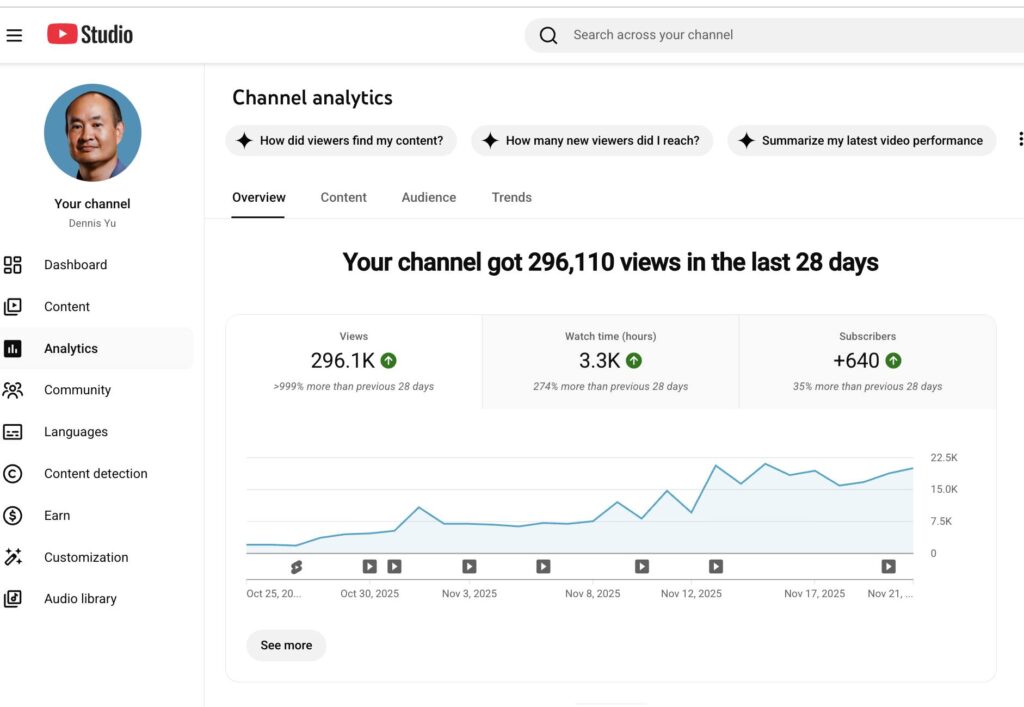
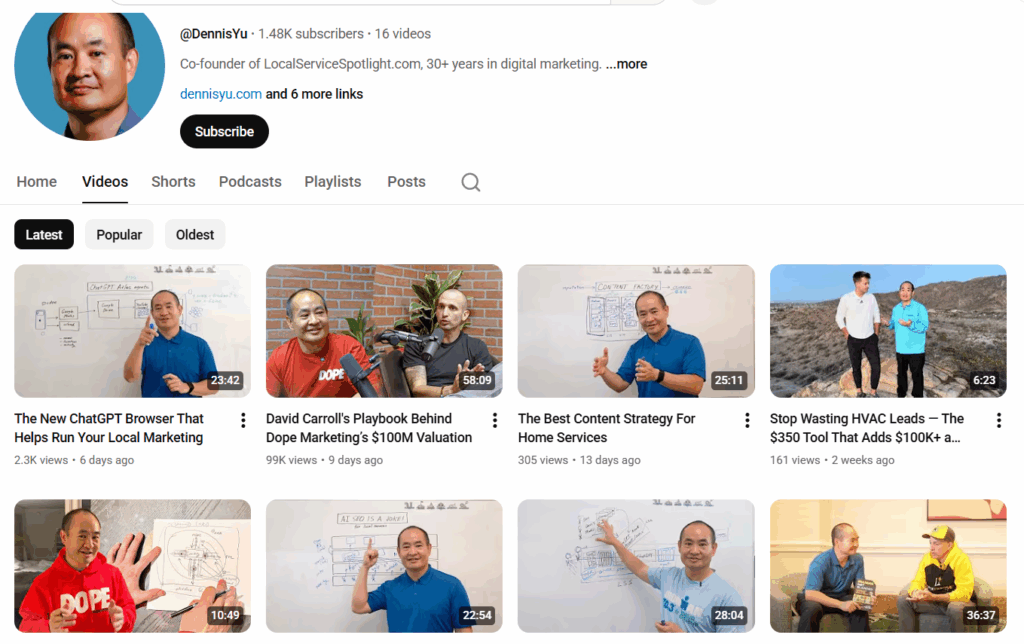
Dennis’ video that got 99K views in 9 days

Step 2: Thumbnails — the most important element

The thumbnail determines whether anyone even gives your video a chance.

Requirements for a good thumbnail:

  • Clean, high-quality image.
  • Big, bold text (3–5 words max).
  • Brand colors used sparingly but effectively.
  • Visual clarity even when tiny on mobile.
  • Clear emotion or visual hook.
  • No clutter, no tiny fonts, no “mystery screenshots.”

Small changes make a big difference, bright colors, sharp contrast, and a clear subject often double click-through rates.

Thumbnails of Dennis’ YouTube channel

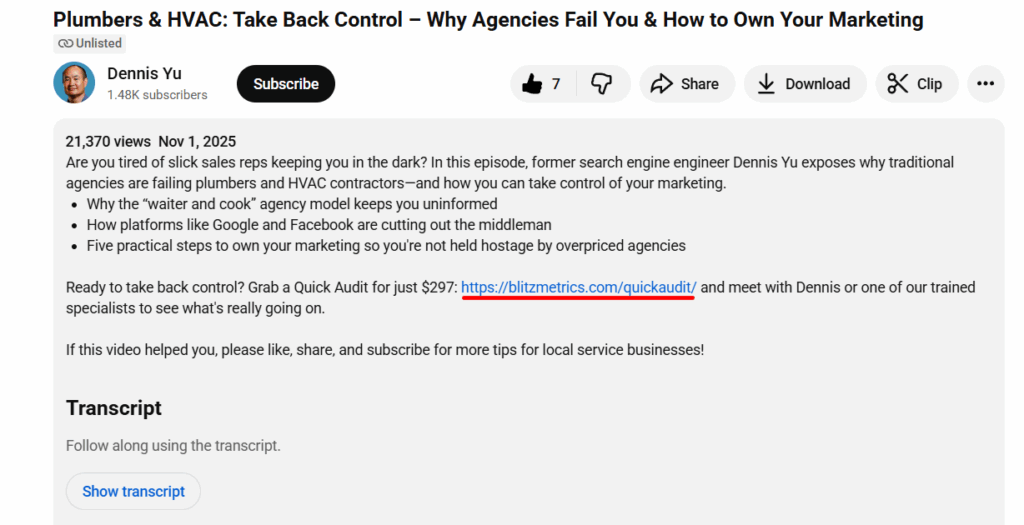
Step 3: Write a strong description with EEAT

A good description helps viewers understand the video and helps YouTube understand whom to recommend it to.

Include:

  • Business name and location.
  • Services or expertise shown in the video.
  • A concise summary of what the video covers.
  • A clear CTA (book a call, learn more, visit website).
  • Links to relevant videos or articles.

A description is free SEO.

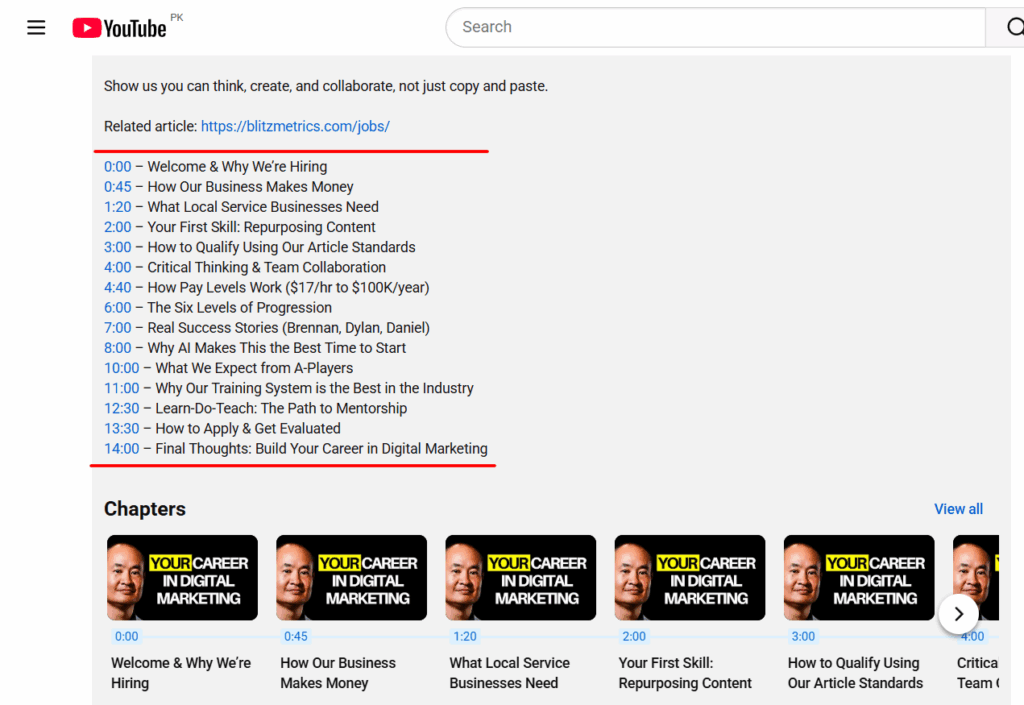
Step 4: Use smart chapters

Chapters make the video more skimmable, add context, and improve watch time.

Guidelines:

  • Use timestamps that reflect real topic shifts.
  • 6–12 chapters for an hour-long video is common, but not mandatory.
  • Avoid flooding the video with micro-chapters.
  • For podcasts: break by topic or guest.
  • For training videos: break by lesson or module.

Smart chapters make the content easier to consume and easier to rank.

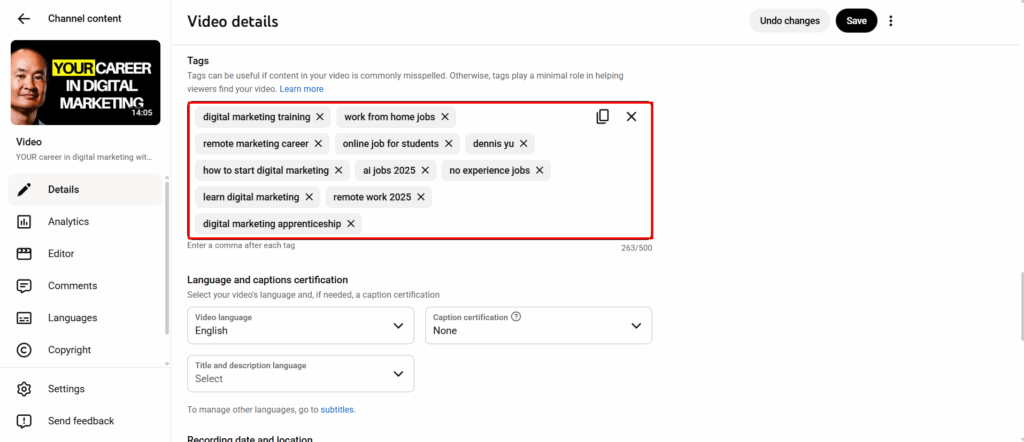
Step 5: Add tags that reinforce discoverability

Tags are not the main ranking factor, but they help with variations, misspellings, and context.

Include:

  • Service keywords.
  • City + service (“Dallas roof repair”).
  • Brand names or tools mentioned.
  • The business name (if available on Google Maps).
  • Collaborator channels or guest names.

Tags shouldn’t be random; they should support the video’s core topic.

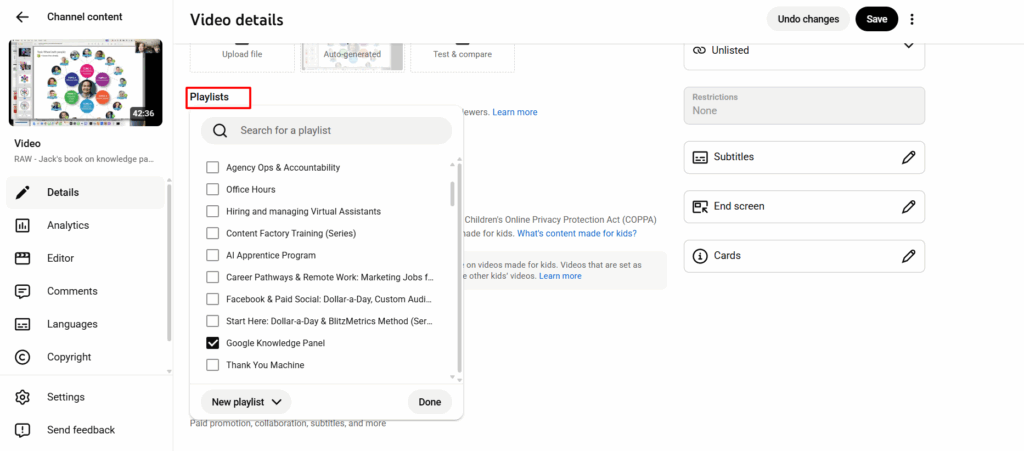
Step 6: Add the video to the correct playlists

Playlists help YouTube understand the topic cluster your video belongs to.

Tips:

  • Add the video to an existing playlist that matches the topic.
  • Use “smart playlists” to group binge-able content together.
  • Don’t leave videos floating on their own, it weakens discoverability.

The more organized your channel is, the easier YouTube can recommend your videos.

Step 7: Monitor for copyright issues or removed content

After publishing:

  • Check YouTube Studio for copyright claims or strikes.
  • If content is removed, review the reason → fix → reupload.
  • Ensure every video has required licensing, disclaimers, and metadata.

Prevention here saves hours of cleanup later.

After uploading: promote and analyze

Once the video is published:

  • Share across social media.
  • Respond to viewer comments to build engagement.
  • Monitor key metrics:
    • Click-through rate.
    • Watch time.
    • Audience retention.
    • Suggested/recommended traffic.
  • Apply insights to improve your next videos.

This is a loop: publish, measure, improve, repeat.

Verification checklist

  • Video is fully processed and QA’d.
  • Thumbnail is high quality and click-worthy.
  • Description includes EEAT details and links.
  • Chapters are clear and helpful.
  • Tags and playlists are correctly assigned.
  • YouTube sheet is updated without breaking previous links.
  • Copyright/licenses checked.
  • Performance tracking initiated.