How To Create And Manage Grokipedia Pages For Clients

Grokipedia (by xAI) is an encyclopedia-style platform similar to Wikipedia, except it’s much easier to request new articles, suggest edits, and build connected entity pages for people, businesses, and brands. For client work, Grokipedia is a fast way to help a business owner build online credibility, connect their digital assets, and create a clean “entity footprint” that can support long-term trust online.

This SOP breaks down the exact process our team can follow to request Grokipedia pages for clients, get them approved, fix mistakes, and maintain them over time.

Why Grokipedia Pages Matter For Clients

A Grokipedia page becomes a central reference point that can connect the client to:

  • Their business entity
  • Their other related entities (podcasts, brands, associations, awards, etc.)
  • Other people in their network
  • Public sources across the internet

Unlike a standard blog post or landing page, Grokipedia pages are structured like a public encyclopedia entry. That matters because these pages are built to summarize “who the person is” or “what the business is” in a clean, structured way that aligns with how entity-based search and AI tools organize information.

Even when the first version isn’t perfect, the edit and revision process is simple enough that we can quickly refine it.

What To Create For Each Client (Required)

For every client, the goal is to create two separate pages, not just one

For example, we created a page for Jeff Hughes, as well as one of his businesses, Rocket Clicks.

1. The Client’s Personal Page

Example: the business owner, founder, doctor, attorney, etc.
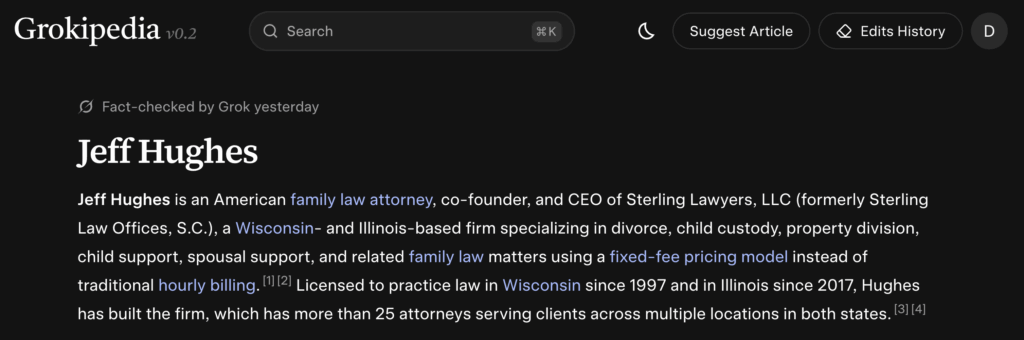
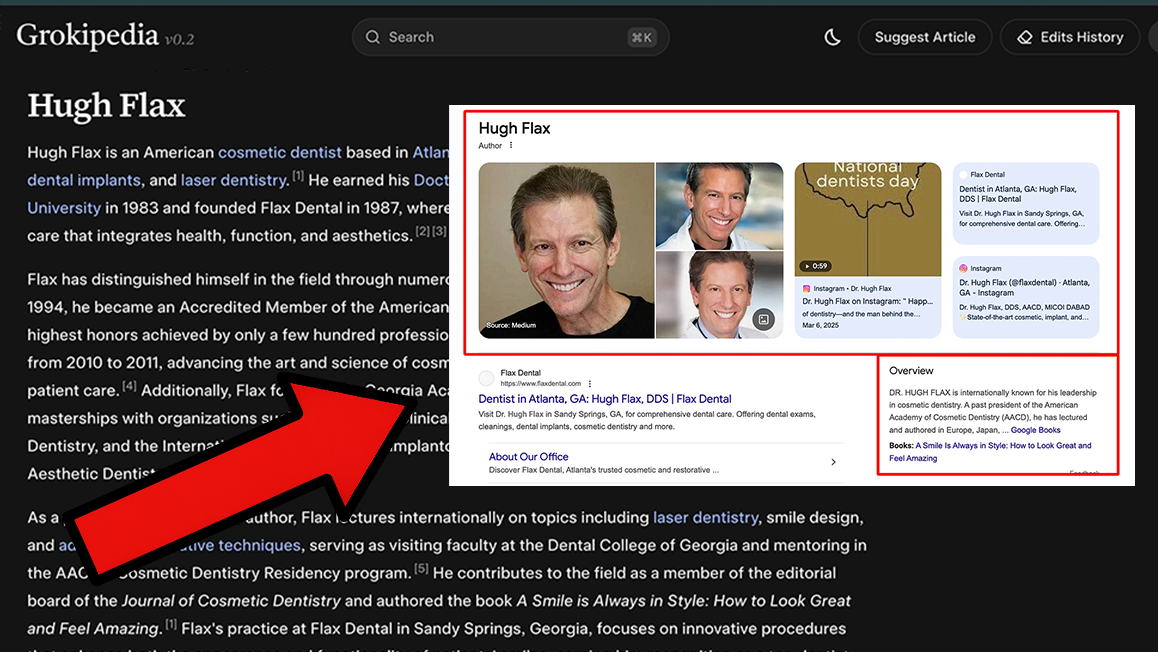
Example of family law attorney Jeff Hughes’ page

2. The Company Page

Example: the client’s dental practice, law firm, home service business, agency, etc.
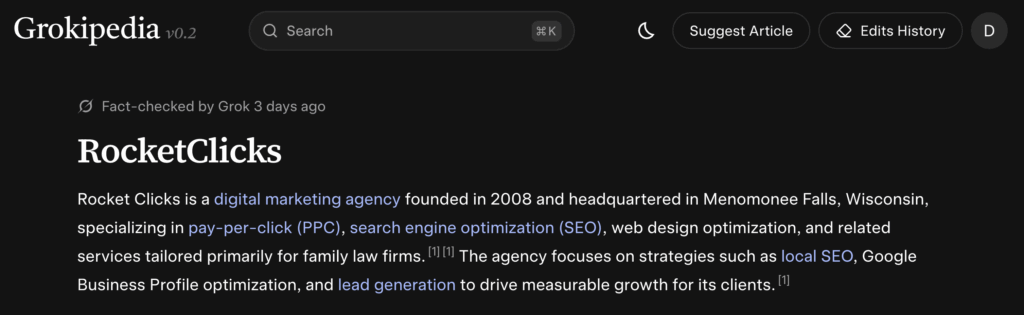
Example of Rocket Clicks’ page, one of Jeff’s companies

This matters because Grokipedia can sometimes confuse the business and the person if the request is framed incorrectly. Keeping them clearly separated increases the chances of approval and makes the pages more accurate.

Step 1: Check If The Page Already Exists

Before you suggest an article:

  • Search the client’s name inside Grokipedia
  • Search the business name inside Grokipedia
  • Confirm whether a page already exists for either one
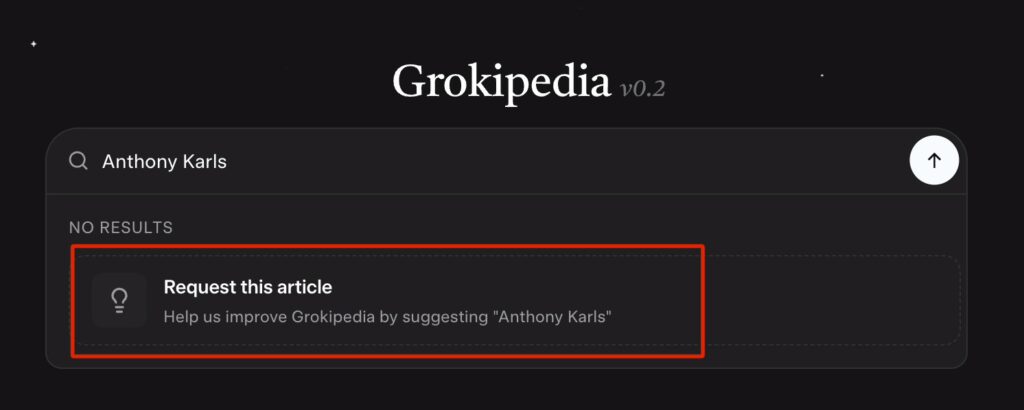
Sometimes a page already exists without us needing to create it. If it does exist, we skip directly to the editing process.

Step 2: Suggest A New Article

If the client does not have a page yet:

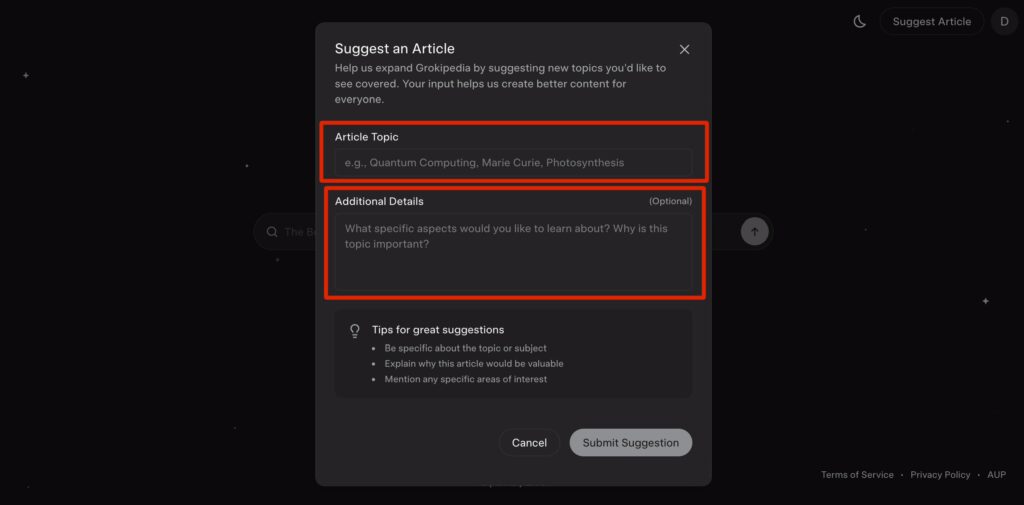
  1. Click “Suggest Article” (or request the article after searching their name)
  2. Enter the Article Topic
    • Use the client’s real name (first + last)
  3. Add Additional Details
    • This is where you guide Grokipedia to pull the right informationWhat To Include In “Additional Details”
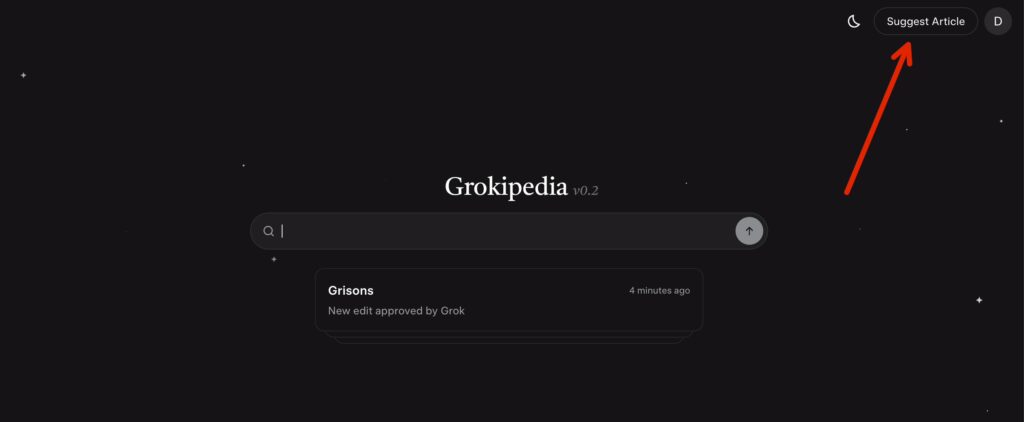
Select “Suggest Article”
Enter article topic / additional details

Focus on facts Grokipedia can verify from public sources, such as:

  • Their job title and role
  • Their business name and location
  • Their specialty (dentist, attorney, contractor, etc.)
  • Known awards, leadership roles, or credentials
  • Public-facing projects (podcast appearances, published interviews, etc.)

Goal: Give Grokipedia the correct angle so it generates a page that matches how the client should be and wants to be represented online.

Step 3: Suggest The Business Article Separately

After the personal page is submitted (or approved), request the business page as its own entry.

Important Note: Avoid The Duplicate Rejection Problem

Sometimes Grokipedia blocks a business page if it believes it overlaps with the owner’s page.
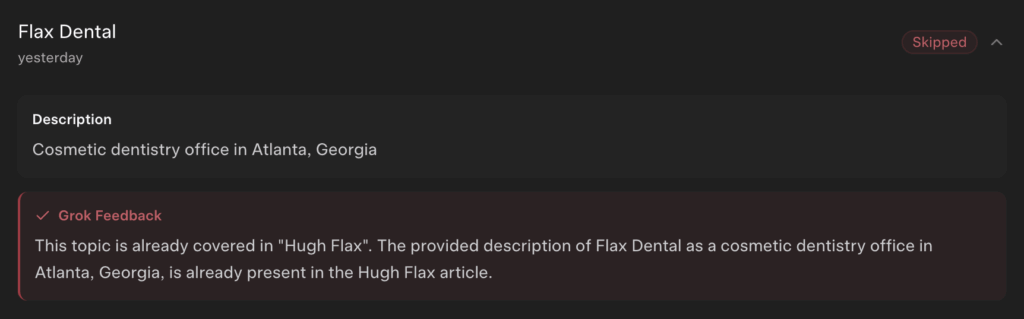
If the business article gets flagged as a duplicate:

  • Don’t mention the owner’s name heavily in the business request
  • Focus on the business as its own entity:
    • what it does
    • where it operates
    • what it’s known for
    • what services it provides

This usually fixes the issue.

Step 4: Review The Page After It Goes Live

Once Grokipedia accepts the request and generates the page, read it carefully.

You’re looking for:

  • Wrong dates
  • Incorrect job titles
  • Wrong location
  • Missing business name
  • Broken links to related entities
  • Mentions that should connect to other pages but don’t
  • Anything incorrect / non-factual

This step matters because Grokipedia is generating content by scraping the internet, which means it will occasionally pull incorrect info, misunderstand context, or mix in results from other people with the same name.

Step 5: Fix Incorrect Information With “Suggest Edit”

To fix something:

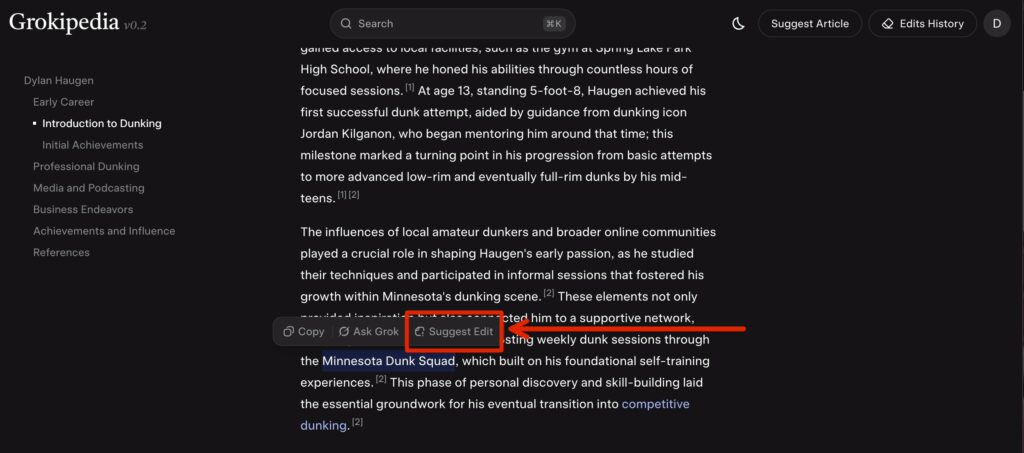
  1. Highlight or locate the incorrect line
  2. Click “Suggest Edit”
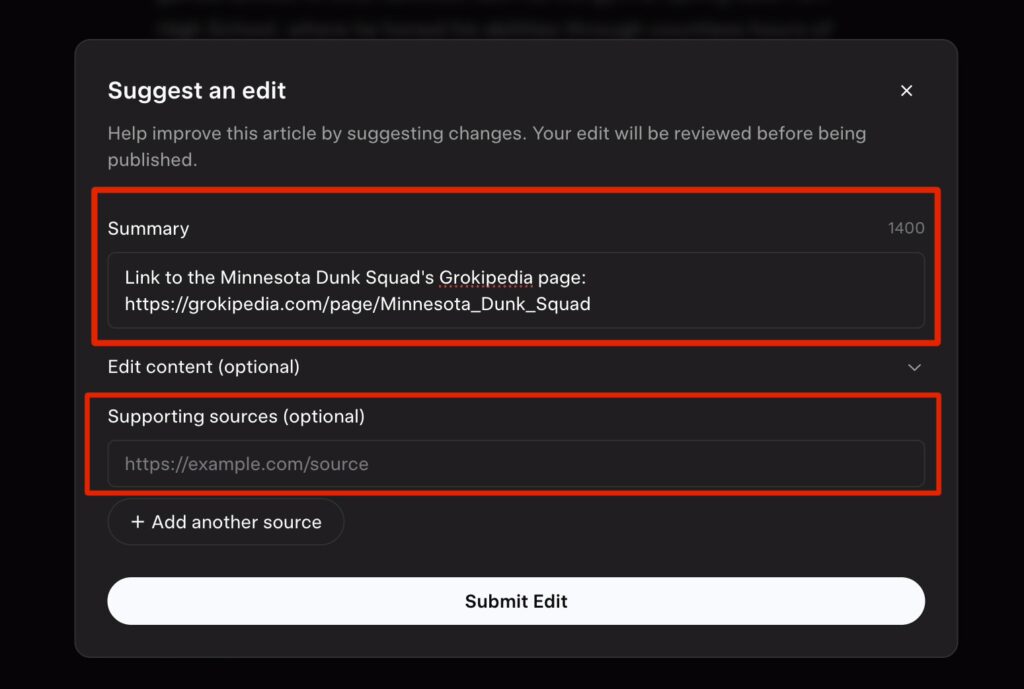
  3. Explain the correction clearly and simply (include verifiable sources, if applicable)
  4. Submit the edit
Select over the text you believe needs edited, then select “Suggest Edit”
Add summary of the edits that are needed, include supporting sources / URLs

Common Client Fixes

  • Correcting dates (events, awards, launches, etc.)
  • Clarifying job roles (owner vs associate, founder vs employee, etc.)
  • Fixing spelling of names or business names
  • Cleaning up descriptions that feel inaccurate or unclear

If your edit gets rejected due to lack of proof, it means the internet sources Grokipedia found didn’t support your change yet.

In that case, you have two options:

  • Find a stronger public source for the correct info
  • Publish a source yourself (website page, article, podcast mention, etc.) and retry later

Step 6: Improve Entity Linking (Huge Benefit)

One of the most valuable parts of Grokipedia is how it interlinks entities.

Even if the article content is fine, it might miss obvious links such as:

  • client → business page
  • client → podcast page
  • client → award / association page
  • business → founder page

How To Fix Linking Issues

If you see a company name mentioned but not linked:

  1. Click Suggest Edit
  2. Request that the term becomes a hyperlink to the correct Grokipedia page
  3. Submit

This is one of the easiest edits to get accepted because it’s not changing facts—just improving structure.

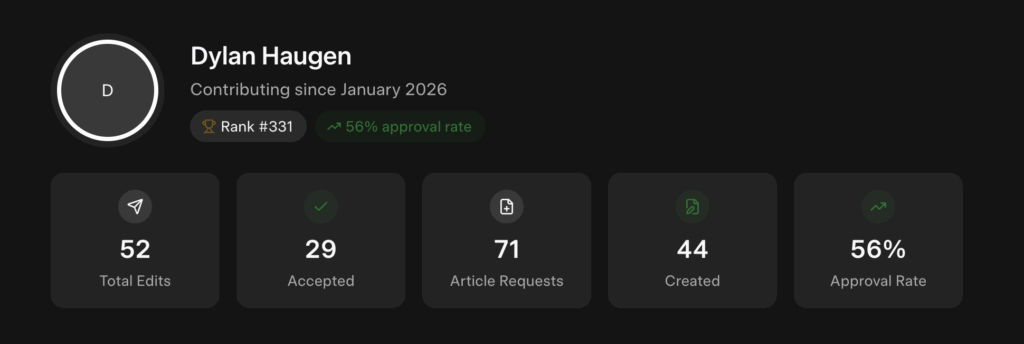
Step 7: Track Your Submissions And Results

Use the Grokipedia Activity/Statistics section to monitor:

  • Your suggested articles
  • Your edits
  • Approval rate
  • Rejections (and reasons)

This helps you learn patterns quickly, because Grokipedia has guidelines on notability and evidence—similar to Wikipedia, but easier to work with.

Common Rejection Reasons (And What To Do)

1. “Not Notable Enough”

This can happen if the entity has very little coverage online.

Fix: Build more digital proof first:

  • podcast appearances
  • client site content
  • interviews and articles
  • awards and associations

2. “Not Enough Sources”

This happens when Grokipedia can’t find enough trustworthy info across the web.

Fix: Create more public sources, then re-submit.

Writing an article honoring someone can further strengthen their Grokipedia page. It publicly recognizes their impact while creating another trusted source Grokipedia can reference for context and credibility.

3. “Duplicate / Already Being Processed”

This is common when creating a business page that overlaps heavily with the owner’s page.

Fix: Rewrite the request so the business stands alone as an entity.

How To Deliver This To Clients (Simple Template)

Once the page is live, send it to the client inside Basecamp (or if you’re not on our team, whatever client communication tool you use):

Message Template:

Hey [Client Name] — great news! We just got your Grokipedia page published. Here’s the link: [paste link]

If you notice anything that needs to be updated (details, dates, links, etc.), send it to me and I can suggest edits, or you can request edits directly on the page as well.

Summary Checklist

For each client:

  • Search client name to check for an existing page
  • Request a personal Grokipedia page if missing
  • Request a business Grokipedia page separately
  • Review the published article for accuracy
  • Suggest edits for wrong info
  • Suggest edits to improve entity linking
  • Share the final link with the client
  • Track approvals and rejections in Activity/Stats

Grok Heavy vs Expert Mode: Using AI Agents to Tame Your Content Inventory

Welcome to the content avalanche. If you’re a local service business — a plumber, roofer, dentist or HVAC wizard — chances are you’ve been cranking out videos and social posts for years. Many of our clients have hundreds of videos scattered across YouTube channels, Facebook, Google Drive and dusty corners of their websites. Trying to make sense of it all can feel like sorting through a teenager’s bedroom after a tornado.

That’s where the new crop of AI agents comes in. Models like xAI’s Grok‑3 and Grok‑4 Heavy, and OpenAI’s ChatGPT‑5, are no longer just chatbots. They’re coordinated fleets of sub‑agents that can search, reason and execute tasks on your behalf. In this article, I’ll show you how we use these tools in our content factory process, when to pick “expert” or “heavy” modes, and why the YouTube API still beats any AI at one job: pulling every last video from a channel.

The Problem: Too Much Stuff, Too Little Time

Local service entrepreneurs are prolific. We coach them to shoot short tips on clogged drains or roof maintenance, and they deliver. Before long they’re sitting on a goldmine of content — but it’s scattered across platforms. A new assistant hired to repurpose clips into ads will ask: “Where do I even start?” Without an organized inventory, good material rots away.

Our solution is to divide and conquer. Instead of asking a single large language model to do everything, we break the job into smaller pieces and assign them to specialised agents:

  1. YouTube crawler – uses the YouTube Data API to enumerate every video in a channel. There isn’t a single API endpoint to download all your videos; you have to loop through pages using the nextPageToken until it’s gone【966214574924081†L20-L27】. Requests fetch up to 50–100 results at a time, and you can specify parameters like channelId, order=date and maxResults【650976862157015†L60-L103】. This agent generates a spreadsheet with titles, links and timestamps.
  2. Social media scraper – pulls posts and comments from Facebook, Instagram or X. Each platform has its own API or export tool, and we give our agent the right keys and instructions.
  3. File‑system indexer – uses connectors like Google Drive to walk through folders and index PDFs, slides, and blog drafts. Because we use agent mode, the AI can read file names and extract key metadata instead of hallucinating.
  4. Aggregator agent – stitches together the outputs. This meta‑agent removes duplicates, tags each asset by topic (e.g., “water heater repair”), and hands the clean inventory to our human editors or another AI model for repurposing.

The magic is not just in the code. It’s in the architecture: multiple agents working in parallel, each with a clear job, and a coordinator to merge their work. This setup mirrors the multi‑agent design described by xAI for Grok‑4 Heavy; their model spins up 8–10 sub‑agents that brainstorm, debate and merge answers into a final response【655535755099413†L77-L86】. Elon Musk calls it “study‑group mode,” and the engineers call it test‑time parallel compute【655535755099413†L83-L86】. We took that idea and applied it to content.

Grok’s Agent‑of‑Agent Approach

xAI’s Grok‑3 introduced DeepSearch, an agent built to relentlessly seek the truth across the entire corpus of human knowledge【470093476559074†L466-L474】. It synthesises key information, reasons about conflicting facts and opinions, and distils clarity from complexity【470093476559074†L466-L474】. When we use Grok 3 or 4 in our process, we harness this search agent to pull background info or competitor research. The model’s reasoning mode can think for seconds to minutes, exploring alternative solutions and correcting errors【470093476559074†L20-L45】.

We often upgrade to Grok‑4 Heavy when tasks demand extra diligence. Here’s why:

ModelAgents per queryToken/context limitTool accessMonthly priceKey strength
Grok 4 (SuperGrok)1256 k tokensPython, X search, Web search≈ $30Fast, cheap baseline
Grok 4 Heavy (SuperGrok Heavy)8–10256 k tokens + extra compute headroomSame tools as Grok 4≈ $300Spawns a miniature think‑tank; sub‑agents brainstorm and merge answers【655535755099413†L77-L86】

With Heavy, each sub‑agent receives the prompt plus a unique “temperament” — one is cautious, another loves math, another loves web search. They think in isolation, publish rationales to a shared scratchpad, and a referee stitches the final answer【655535755099413†L88-L199】. The result is slower but more thorough. In our experience, Grok 4 Heavy’s agent‑of‑agent design finds obscure details and cross‑checks sources better than anything else. If you’re digging into the physics of a black‑hole animation or a complex plumbing regulation, Heavy pays for itself.

ChatGPT‑5 Modes: Auto, Fast, Thinking and Pro

OpenAI’s ChatGPT‑5 takes a different approach. It uses a dynamic router to decide which sub‑model to run, balancing cost and reasoning depth. Users can still override the system and choose specific modes:

  • Auto – lets the system decide whether to prioritise speed or reasoning.
  • Fast – delivers instant answers with minimal delay.
  • Thinking – takes more time but provides detailed, step‑by‑step reasoning【292075143200784†L194-L199】.
  • Pro (sometimes called “Expert”) – offers the highest level of accuracy and reasoning depth for research‑grade tasks【292075143200784†L194-L199】.

Unlike older versions where you picked between GPT‑4o or GPT‑4o‑mini, these are now variations of the same core model. A dynamic router decides in real time whether to deliver a quick reply or switch to deeper reasoning【292075143200784†L194-L206】. In our tests, the Thinking mode is usually sufficient for summarising a Google Drive folder or analysing a Facebook page. Pro shines when writing long‑form articles or doing technical research. The lower‑cost modes are great for trimming transcripts or generating quick email drafts.

YouTube API: Still the Best Source of Truth

No matter how advanced the agents get, there’s one place where a plain API call still beats everything: collecting your own videos. The YouTube Data API doesn’t offer a single endpoint to list all videos; you must iterate through paginated results. Each call returns up to 50 videos and includes a nextPageToken if more results are available【966214574924081†L20-L27】. A simple loop using the search endpoint with channelId, order=date and maxResults can retrieve IDs, titles and thumbnails【650976862157015†L60-L103】. We then feed that data into our agent pipeline. This approach is faster and more reliable than asking a language model to scrape YouTube because it avoids hallucinations and respects API quotas.

Choosing the Right Tool for the Job

So which model should you use? Here’s how we decide:

  1. Inventory tasks – Use dedicated APIs (YouTube, Facebook, Google Drive) and simple scripts. Agents can orchestrate the calls and assemble the results.
  2. Basic summarisation and classification – ChatGPT‑5’s Fast or Thinking modes are usually enough. They’re cheaper and good at clustering topics.
  3. Deep analysis or compliance checks – Grok 4 Heavy’s multi‑agent “study‑group” mode digs deeper and cross‑references more sources【655535755099413†L83-L86】. Use this when accuracy matters more than speed.
  4. Long‑form writing and technical research – ChatGPT‑5 Pro (a.k.a. Expert) or Grok Heavy both work. ChatGPT‑5 Pro offers step‑by‑step reasoning【292075143200784†L194-L199】; Grok Heavy brings multiple perspectives.
  5. Cost‑sensitive tasks – Stick with standard Grok 4 or ChatGPT’s Auto/Fast modes. Save the heavy modes for high‑impact projects.

Choose the Right Grok Mode for Your Content Inventory Workflow

AI agents aren’t magic fairy dust. They’re tools that shine when you give them clear roles, reliable data and a well‑designed workflow. By dividing the grunt work among specialised agents, local service businesses can finally tame the chaos of their content libraries. At the end of the day, the combination of API‑driven data collection and multi‑agent reasoning gives you the best of both worlds: speed, accuracy and sanity. And if you’re wondering whether to splurge on Grok’s heavy mode or stick with ChatGPT’s Pro, just ask yourself: Is this job worth a study group of eight AI brains? If yes, fire up the Heavy engines; if not, keep it lean and mean.

To explore more insights and training resources, check out our other platforms: BlitzMetrics, DennisU.com, and JackWent.com.