The True Cost of Low-Quality Work in Your Business

Incompetence is incredibly expensive in business, whether it comes from an employee, contractor, freelancer, or virtual assistant. Low-quality work plagues everyone, not just VAs. Whenever we’re hiring or delegating, we always screen for quality and understanding of GCT (Goals, Content, Targeting), not just price.

You’ll often see business owners and agencies hire solely based on price, since $3/hour sounds better than $8/hour. But what difference does a few dollars make if poor work ends up costing ten times more in revisions, delays, and oversight?

In this article, let me walk you through what happens when someone (anyone) makes the #1 VA mistake of working without full understanding and how it ends up costing far more than most realize.
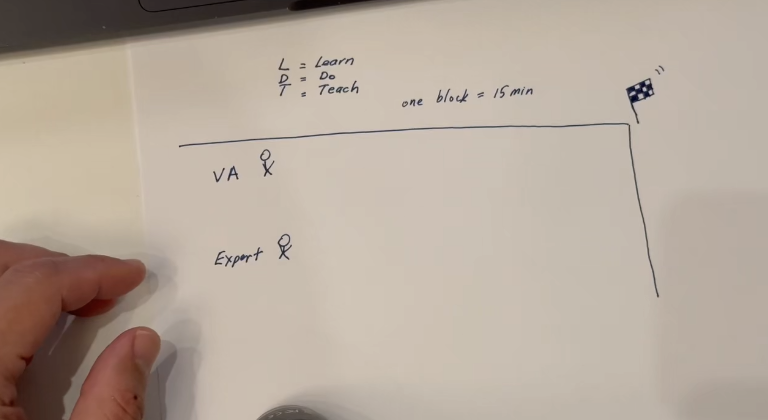
VA working with an expert on oversight

Understanding the Cycle of Inefficiency

Let’s say we hire someone to repurpose a video into an article. Sounds simple, right? Here’s what usually happens:

The time and effort it takes to review, correct, and manage their output far exceeds the time they save. For example, let’s break this into 15-minute units.

First, they must learn the material, that’s the “L” in LDT (Learn, Do, Teach). This might take 30 minutes or more because they need to understand the topic deeply before they start producing.

If they’re writing about ARDMOR Windows & Doors, a window installation company in Willow Grove, Pennsylvania, they need to know the owner, service area, offerings, and customer experience. Without context, they’re flying blind.

Then comes the “Do” phase. the actual writing. That’s where mistakes creep in: missing links, weak structure, poor grammar, or a complete misunderstanding of the topic. Even with clear standards and examples, many skip steps or ignore guidance.

So we bring in an expert to teach them what went wrong. Ironically, that explanation often takes as long as creating the original content from scratch.
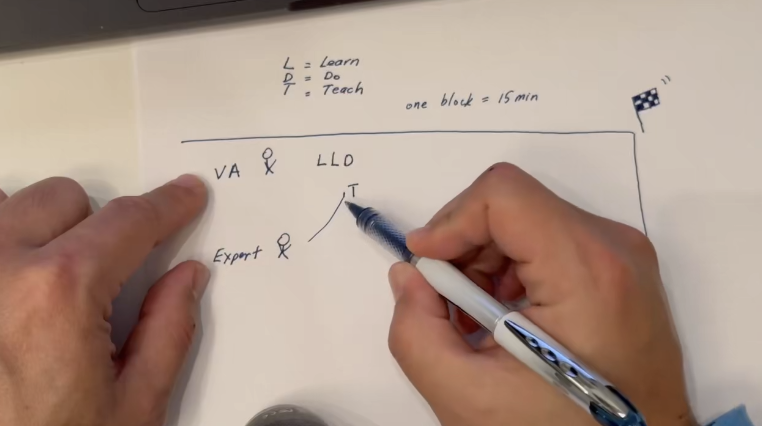
The expert privately training the VA

They go back, fix it, and still miss the mark. The cycle repeats (sometimes over 15 iterations) for something that could’ve been done right the first time in 15 minutes.
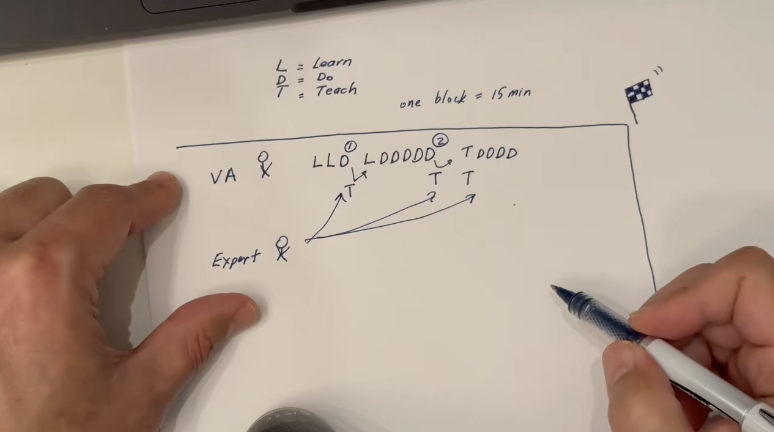
Several private training sessions to produce 1 piece of work

Every round adds cost. Not just the worker’s time, but the manager’s time, the expert’s time, the overhead of project management tools, and the opportunity cost of delays.

Sound familiar?

The Hidden Costs Add Up

Imagine paying someone $5/hour who takes 20 hours to finish a task. That’s $100. Then imagine hiring someone for $15/hour who completes it perfectly in two hours, $30 total.

Which one’s actually cheaper?

As business owners, we don’t care about hourly rates. We care about results: finished, accurate, and on time.

The Marines say: “Slow is smooth and smooth is fast.”

A skilled worker might look more expensive at first glance, but fewer mistakes and iterations make them the better deal every time.

The real waste comes from paying people to learn on the job while you or your senior team members act as their personal tutors. That’s not training; that’s paying twice for the same task.

Why Revisions Are the Real Problem

People often say, “This task took too long.” But that’s not the right question.

The right question is: Does this person have the competence to get it right without needing corrections?

If we were training surgeons, would we ask whether they should practice on patients for 10 minutes or 10 hours? No. The real concern is whether they should be operating at all until they understand what they’re doing.

The same applies in business.

The litmus test for any contributor is this:
Can they submit work that requires zero revisions?

Most of the QA issues come from:

  • Missing or incorrect context.
  • Weak comprehension of the subject (the #1 VA mistake).
  • Grammar and formatting errors.
Establishing the right context is a key element of EEAT

When I create content myself (videos, articles, or training) it’s done in one take. No scripts, no edits, no corrections. Eighteen minutes, start to finish.

All 4 stages of the Content Factory completed in under 18 minutes and generating traction

But when someone without that depth of understanding tries to “improve” or repurpose it, it can take 4–5 hours across multiple revisions. That’s time spent correcting, teaching, and chasing; all unproductive overhead.

The Failure of Competence Is a Failure of Learning

Doctors don’t do 25 iterations of a simple surgery because they learned properly before operating. In business, repetitive cycles are a sign someone skipped the learning part of LDT.

24 iterations over 1 month to produce 1 piece of content

Someone who studies the material, asks the right questions, and pays attention can produce a finished piece in under an hour. Someone who doesn’t might take a full month.

Quality Above All

Hiring skilled people might look expensive on paper, but it’s the cheapest decision you can make in practice. You wouldn’t choose the cheapest heart surgeon, right? You’d pick the one who gets it right the first time.

We believe in limiting iteration cycles because the only way to scale output is to reduce rework. It’s that simple.

In the end, what matters isn’t how many hours someone works; it’s how much gets done right without supervision.

So, next time you’re hiring or delegating, think beyond the hourly rate. Think about how much it costs to get the job done right, once.
Client Meeting Checklist: Before, During, and After the Call

Most people treat client meetings like a chore. They show up unprepared, ramble for an hour, and wonder why the client doesn’t respect them.

That’s not how we operate.

A client meeting is a performance. It’s where you prove you’ve done the work, you understand their business better than the last dozen “experts” they hired, and you can move the project forward without wasting anybody’s time.

Here’s the real system: what to do before, during, and after the meeting so you look like a pro instead of a flailing rookie.

Before the meeting: This is where you win or lose

If you’re prepping during the meeting, you’ve already lost. The client can smell it. So let’s avoid that embarrassment.

Know the client like you actually care

Don’t go into a meeting blind. Do your homework.

  • What are their goals?
  • What content do they have?
  • What audiences matter?
  • What’s their personal stake?
  • Who is actually showing up to the call, and what do they care about?

Look them up on LinkedIn, Facebook, Twitter, wherever.
This isn’t stalking. It’s called being a professional.

Executives notice when you know the details. They also notice when you don’t.

Lock down the logistics

If it’s virtual:

  • Use the correct Zoom account.
  • Test your mic and camera like a grown-up.
  • Put your camera on top of your monitor.
  • Put the Zoom window right under the camera so it looks like you’re actually looking at them instead of staring at your own face in the corner.

If it’s in person:

  • Show up early. Not “on time.” Early.
  • Bring printed materials.
  • Leave your phone and laptop shut. Your attention is the flex.

Prepare the actual materials (not a data dump)

A report isn’t enough. Anyone can dump numbers into a Google Doc.

Your job is to analyze, not regurgitate.

You need:

Then run it through someone senior for a sanity check.
One typo and the client starts wondering what else you missed.

Send the agenda + “looking forward” note

The day before the meeting:

  • Send the agenda.
  • Send any pre-reading.
  • Post a “Looking forward to our meeting tomorrow” message in Basecamp.
  • Make sure the Zoom link is correct (stop making clients chase you for it).

It takes 30 seconds and instantly makes you look organized.

Set expectations like a leader

You’re not a vendor taking orders. You’re the one driving the process.

So you set expectations:

“This should take no more than 30 minutes. Here’s what we’ll cover. Here’s what we need decisions on.”

Clients love clarity.
They hate surprises.

During the meeting: Run the room

This is your stage. Don’t wander onto it looking lost.

Start with structure

Kick off the meeting with confidence:

  1. Agenda.
  2. Introductions.
  3. What decisions need to be made?
  4. Quick tie-back to the previous meeting so it’s clear you actually remember things.

No rambling. No awkward small talk unless it serves a purpose.

Don’t look like you’re half-listening

Some ground rules:

  • No multitasking.
  • No typing during in-person meetings.
  • No phone on the table.
  • Eyes on the camera.
  • Sit up straight, you don’t need to hunch like you’re defusing a bomb.

People pick up on micro-signals. Your posture tells them whether you’re confident or guessing.

Notes = action items

Notes should be:

  • What needs to be done.
  • Who owns it.
  • When it’s due.
  • What depends on what.

That’s it. Nobody needs a transcript.

Call out at the beginning who is taking notes so the client knows the trains are running on time.

Keep the meeting tight

Most client calls default to “one hour” because nobody has the spine to challenge it.

You do.

If you prepare properly, a great meeting rarely needs more than 30 minutes.

Stay on the agenda.
Don’t go down rabbit holes.
Focus on decisions, not storytelling.

Executives want the executive summary.
Give it to them early and often.

End like a professional

Never end a meeting with “Alright… I think that’s everything?”

Here’s your script:

“Okay, Tom, here are the items we agreed on. Let me know if I missed anything.”

Then ask:

  • “Anything we can do to make you look good?”
  • “Any feedback for me?”
  • “Anything you’re worried about that we haven’t addressed?”

Then, and this is key, schedule the next meeting before anyone hangs up.
The calendar is where momentum lives.

After the meeting: Close the loop

This is where average account managers drop the ball. Not you.

Clean up your notes (same day)

If your notes read like a toddler typed them, fix them before posting.

Then drop them in the Basecamp Client Meetings thread the same day.

Same. Day.

Upload the recording

Put the Zoom recording next to the notes.
This saves your team from asking you the same questions five times.

Convert notes into actual tasks

Put every action item into:

  • Basecamp To-Dos.
  • With owners.
  • With deadlines.
  • With dependencies.

Don’t trust your memory. Memory lies.

Reply like a pro, not a panicked intern

If the client:

Emails you + CCs leadership:

Reply in that thread. Everyone stays in the loop.

Messages you privately:

Reply in Basecamp or with a quick call depending on urgency.

The executive summary: Your superpower

This is the only section executives reliably read.
So make it count.

It should include:

  • Their goals.
  • What we’ve done.
  • What we’re doing next.
  • Results, conversions, ROI.
  • Budget changes.
  • Dependencies.
  • Time remaining in the project.
  • What to expect next.

Make it:

  • Clear.
  • Bold.
  • No passive voice.
  • No “legal document” tone.
  • No saying “their”, talk directly to them.

Executives want clarity, confidence, and direction.

The mindset: every minute should feel worth $50

When a client meets with you, they should feel like:

“This was worth my time. These guys are sharp.”

We’re here to run multi-million-dollar campaigns, improve people’s businesses, and give clients the confidence that they’re in good hands.

You do that by owning the meeting, start to finish.