We’ve had a few cases where a client enrolled one person in the AI Apprentice program, then later tried to add a few more team members “just to listen in.”
While we love the enthusiasm and absolutely want teams to learn together, the program is intentionally one membership per person, not a group pass.
Think of it like a gym membership
When you buy a gym membership, it’s not a “family plan.” You can’t bring your whole household to train under your name.
The same principle applies here. Each participant gets:
Progress tracking and certification under their name.
Direct implementation coaching.
If we let extra people join under one registration, it defeats the purpose. The mentoring and accountability get diluted, and the program stops being effective.
Dylan Haugen
Marko Sipilä
David Carroll
Caleb Guilliams
The “awkward parent” analogy
Imagine paying for your son’s college tuition, then following him around campus, popping into his classes, and sitting in the back row.
You’d never want to be that mom who makes her kid look uncool to his classmates.
Of course, there are times when parents are welcome, open houses and parent–teacher conferences.
Likewise, we’ll host team-wide sessions or demo days where everyone can join and learn. But the core apprentice experience? That’s personal, hands-on, and meant for the enrolled student only.
What if your company has multiple team members?
That’s great, train them all!
Just enroll each person individually.
Each person gets one-on-one mentorship, feedback on their own work, and certification under their own name.
When we keep the structure this way:
Everyone stays accountable for their own growth.
Each person has a clear progress record.
The learning stays high-quality and hands-on.
Why this policy matters
Our mission is to train young adults to become competent digital marketers through doing the work, not just observing it.
When only one person is officially enrolled and others “listen in,” it short-circuits that process.
We don’t want spectators; we want implementers: people who follow the Content Factory process, take action, and see measurable growth.
The bottom line
Each AI Apprentice membership = one student.
If you want to train multiple people, fantastic, just enroll each one properly so they all get the full experience, not the awkward “parent in the back row” version.
ChatGPT Teams (aka Business) now lets us share threads.
The $20/month personal plan (called Plus) doesn’t let you share threads or work together with team members, but you could export documents, which is clunky.
Our ChatGPT business account also lets us use GPT 5 Pro, Agent, and Thinking go beyond the per user caps (which solo accounts cannot get beyond).
We’re paying about $100 a day for pooled credits on top of the $30 a month we’re paying per user.
You can see the rate card on how many credits various tasks cost (50 credits per Pro request, for example).
But the agentic work is worth many times that.
To have ChatGPT be able to log into any system you provide access to and follow your verbal directions (governed by SOPs you specify) is incredibly powerful.
VAs are cooked.
Now one A player can do 10 times the work, while everyone else is on a path to unemployment.
If you’re a client (agency or coaching) and want us to add you to our Business account, let me know.
I’ll eat the cost as part of what you’re already paying– no extra charge.
And if you’re not an AI Apprentice ($2,500 for a year) or a monthly member (Office Hours at $297 a month), you can still sign up to be grandfathered in for as long as you’re active.
Here’s how to start using our internal GPTs right away:
Once you’ve been added to our ChatGPT business account, you’ll have access to all the custom GPTs we’ve built to make your work faster, smarter, and more consistent.
If you’re not yet on our business workspace, find out who qualifies and how we handle access costs here:
If you’ve ever dropped a link in your YouTube description and realized it’s not clickable, that’s not a glitch; it’s a verification issue.
This video broke down how you can deal with unclickable links step by step to make them functional.
YouTube requires every channel to complete a one-time verification process before allowing live links in video descriptions or end screens.
If you skip that step, your viewers can see your calls-to-action (“Get a free audit,” “Book a consultation,” “Join our academy,” etc.), but they can’t click them.
That means you’re losing traffic, leads, and sales with every view.
Why It Happens
YouTube automatically disables clickable links for any channel that hasn’t verified ownership.
It’s a built-in safeguard to prevent spam and scams, but it also affects legitimate creators and businesses who just haven’t done the setup yet.
Luckily, the fix takes just a few minutes.
How to Enable Clickable Links on YouTube
Only the channel owner can complete the verification.
Here’s exactly how to do it:
1-. Open YouTube Studio Go to studio.youtube.com and make sure you’re signed into the right channel.
2. Go to Settings In the bottom-left corner, click Settings.
3. Select Channel → Feature Eligibility From the left-hand menu, click Channel, then Feature Eligibility.
4. Verify All Features You’ll see options under “Feature Eligibility.”
Expand each section and follow the prompts to verify your identity.
Some may require a phone number or ID.
Others may ask for a quick video verification.
Once you complete the process, YouTube will unlock your account for external linking, meaning your website, lead form, or offer links in your descriptions will become clickable again.
Why It Matters
For agencies and creators who rely on CTAs to drive results, this step is essential.
Every video you post should have a functioning path that moves viewers from watching to taking action, whether that’s booking a call, signing up, or making a purchase.
Verifying your channel ensures your content does its job: turning attention into conversions.
Every week, we send helpful insights, training updates, and reminders to our Home Service Owner community.
But instead of sending one-off messages manually, we built a repeatable process in Keap Classic (Infusionsoft) that lets us design, personalize, and deliver every broadcast efficiently — while keeping the tone warm and human.
Step 1: Accessing the Broadcast Tool
It starts in Keap’s main dashboard. We go to Marketing → Email & Broadcasts, then click + New Email Broadcast.
This is our control center — where each announcement, promo, or newsletter begins. No complicated automation here; just a clean, one-time email to a segmented audience.
Step 2: Choose a Template or Start From Scratch
Keap gives you three starting options:
Use a blank email — start from zero for complete creative control.
Select a pre-made template — great if you want a professional layout fast.
Use a recently sent email — ideal if you’re resending to a similar audience.
Step 3: Design Your Email
Inside the drag-and-drop builder, you can:
Add text, images, buttons, and dividers.
Adjust styles, spacing, and layout.
Personalize content using merge fields, such as ~Contact.FirstName~.
Example: “Hey ~Contact.FirstName~, we’ve got something exciting to share!”
Step 4: Set Your Subject Line & Pre-header
Your subject and preview text are critical for open rates. Pro Tip: Keep subject lines under 50 characters Use the preview to spark curiosity or summarize the email
Step 5:Choose Your Recipients
You can send to:
Tags
Saved searches
Individual contacts or lists
Only marketable contacts will receive your email. Avoid sending to unengaged or unverified contacts.
Step 6: Send or Schedule
You’ll get the option to:
Send immediately
Schedule for a specific date/time
Before sending:
Preview mobile & desktop
Test all links
Review time zone
Final Tips
Personalize every email with your contact’s name.
Keep messages short and visually clean.
Test before sending to catch any issues early.
Reuse and improve successful templates to save time.
That’s it! You’ve now learned how to create, schedule, and send a broadcast email in Keap Classic — the same process we use to reach Home Service Owners and other client segments efficiently.
We use Basecamp to manage all client communication, deliverables, and updates. It keeps everything organized; no messy email threads or lost attachments.
Here’s how to get started the right way.
1. Accept the Invitation
After we add you to your project, you’ll receive an email from Basecamp with the subject line:
“You’ve been invited to Basecamp!”
If you don’t see it, check your spam or promotions folder.
Click the join project or accept invitation button in that email.
2. Create or Log In to Your Account
If this is your first time using Basecamp:
— Click create an account and use the same email address where you received the invite.
— Set a password you’ll remember.
If you already have a Basecamp account: just click log in and you’ll be added to our workspace automatically.
3. Access Your Project
Once you’re in, you’ll see your project (for example, “AI Apprentice Program” or your business name).
Click on it to open your workspace.
Inside you’ll find:
Messages: announcements and updates from our team.
To-Dos: tasks and milestones we’re tracking.
Docs & Files: all shared assets, templates, and deliverables.
Campfire: a group chat for quick discussions.
Tip: Bookmark your Basecamp project page so you can access it anytime.
4. Add Your Team (Optional)
If you have team members who should be looped in (like an assistant, marketing lead, or operations manager) let us know.
We’ll invite them too, so communication stays transparent and efficient.
5. Need Help Logging In?
If you see an error like “You don’t have access”, it usually means:
You’re using a different email than the one invited, or
The invite link expired (they do after a while).
No problem, just reply to your onboarding email or email Operations, and we’ll reset your access right away.
Final Tip
Basecamp is your control center for everything we do together. Keep notifications on, and check in at least once a week for updates, approvals, and progress reports.
You’re here because you want SEO that actually drives business—not just clicks, keywords, or vanity traffic. This is the SEO Tree, the system we use to build authority for brands like Murphy Door, Plumbing Pros, and Anthony’s Lawn Care.
This isn’t theory. It’s a playbook tested across thousands of posts, pages, and campaigns.
What Is the SEO Tree?
Think of your website like a living tree:
The trunk is your main topic or money page—what already ranks and earns.
The branches are supporting subtopics that expand on the trunk.
The leaves are examples, stories, and proof that tie everything together.
When all of those connect properly—trunk to branch to leaf—Google and ChatGPT understand who you are, what you do, and where you’re strong. But when they don’t, you get scattered posts competing with each other, and rankings die off.
Dennis summed it up perfectly in the training:
“When the content is connected—up, down, and sideways—it feeds authority like sap running through the tree. But when you throw random posts out there, it’s like cutting off branches and expecting the tree to grow.”
The #1 VA Mistake: Context Blindness
This ties directly into what Dennis calls “The #1 VA Mistake.” Most virtual assistants, writers, or editors focus on output instead of understanding. They repurpose videos or transcribe podcasts without knowing why the content exists or where it fits.
Dennis put it bluntly:
“If you repurpose content with no context, you’re not helping—you’re vandalizing.”
That’s what happens when people write without knowing the GCT (Goals, Content, Targeting). You can’t create authority if you don’t know:
What the goal of the piece is
What content already exists
Who the audience is
A perfect example of this was my own experience writing about Travis Reynolds, a professional dunker. I stayed with him in North Carolina, went to dunk camps with him, and recorded podcasts and YouTube videos documenting his story. Because I had that real context—what drills he used, what events he competed in, and what it was like to train with him—the article wasn’t generic fluff. It had depth. It became the trunk, and all those clips and episodes became branches and leaves that strengthened it.
That’s what understanding the context does—it turns disconnected media into a structured, credible topic cluster.
Search engines and users both look for signs that you’ve actually done the thing you’re writing about. That means showing real names, real places, and real moments.
When I wrote about Travis Reynolds, it wasn’t secondhand. I’d stayed with him in North Carolina, trained with him, filmed at Dunk Camps, and recorded podcast episodes about his story. Those real experiences—locations, people, and moments—gave the content credibility.
That’s the “Experience” and “Expertise.” Linking to our Dunk Talk Podcast built “Authority.” Showing footage and ongoing work added “Trust.”
If someone without that context tried to repurpose the same material, they’d miss everything that made it real. They wouldn’t know the events, the relationships, or what professional dunking even is. The result would be hollow, inaccurate, and ultimately useless.
Google rewards lived experience. Real proof beats AI filler every time.
Thinking in Clusters
Once you understand E-E-A-T, you start to see that SEO isn’t about isolated pages. It’s about clusters—a group of related content pieces built around a central topic.
Dennis explained this concept during the section on moving up, down, and across the SEO tree:
“Moving up means higher authority. Moving down means more detail. Moving across means related topics. You need all three.”
When I started outlining my upcoming book, The Ultimate Guide to Getting a Google Knowledge Panel, I didn’t just plan a single article. I built a cluster—draft chapters, training clips, and past posts that all linked back to the same main concept. Each one reinforced the others.
That’s what a true SEO cluster looks like. It’s not random content—it’s a coordinated system that feeds credibility both to humans and search engines.
The Content Factory
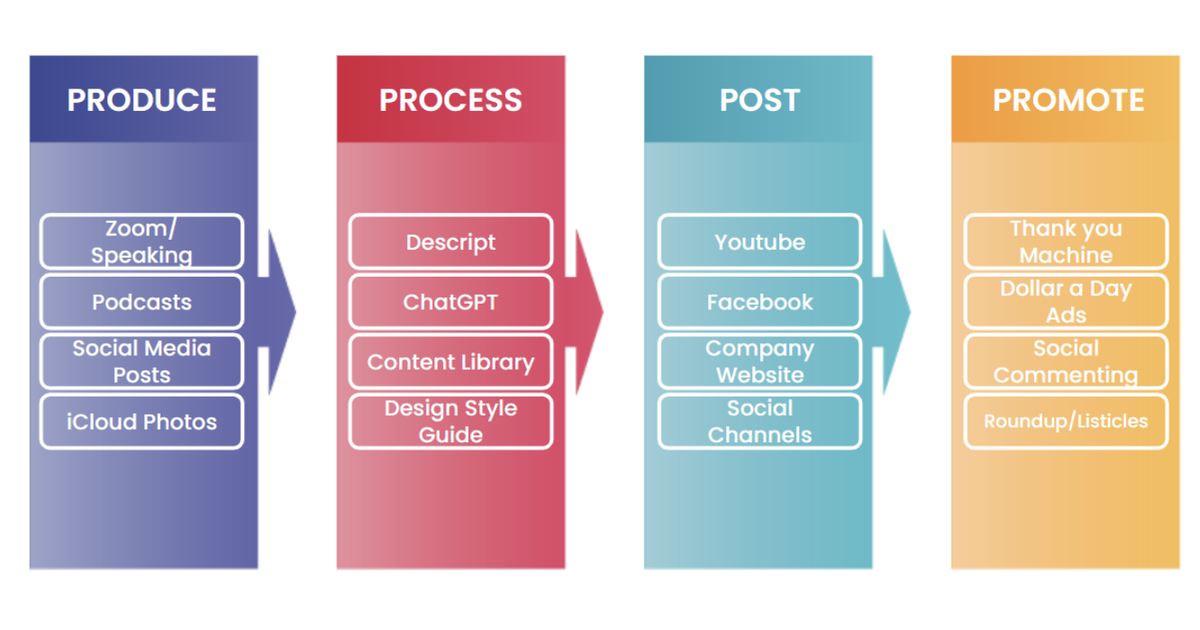
Every strong SEO Tree runs through the same process—what we call the Content Factory:
Produce: Capture raw proof—photos, videos, CRM notes, reviews, field service data.
Process: Edit, clean, and organize the proof into useful media.
Post: Publish it to owned channels—your website, YouTube, GBP, and social.
Promote: Distribute the winners, amplify what converts, and collect more proof.
Now, here’s where most businesses go wrong—they break this flow apart. One person only does video editing. Another only does thumbnails. Another writes the captions.
That sounds efficient, but it’s not.
I used to just edit videos. But once I learned the entire process—from raw clip to post to promotion—I could produce content five times faster and with far more consistency.
As Dennis put it:
“We don’t want thumbnail people. We want people who understand the entire system—because when you see the big picture, you make smarter decisions at every step.”
When one person owns the full pipeline, they can move from idea to post in minutes, not weeks. That’s how real content factories run—tight, fast, and accountable.
Enhance Before You Create
Don’t publish new pages just to feel productive.
Before adding new content, enhance what already performs. Add examples, update links, and strengthen structure. Only create new material when it fills a genuine gap or targets a new query.
Dennis reminded everyone during training:
“Pretty much every topic you can think of is already covered. The opportunity isn’t in starting over—it’s in improving what’s already working.”
Although we recommend that each content piece should have at least three internal links, every single one must make sense to actually pass authority and be effective.
Internal links are how power moves through your SEO Tree. You want to direct that power to pages that matter—your trunks, branches, and proof pieces—not to random sites that don’t help you.
We see this mistake constantly in article submissions: someone links out to Google’s homepage, Facebook.com, or Wikipedia just because they mentioned it in passing. Those sites don’t need your help—and you’re not affiliated with them. Linking to them only bleeds your authority instead of strengthening your own network.
As Dennis explained:
“When you link out to those big companies, you’re literally giving your power away. It doesn’t help your SEO, and it doesn’t help the reader. Keep the juice inside your ecosystem.”
So, instead of pointing to those giants, link to your own assets: case studies, service pages, related blog posts, client spotlights, or YouTube videos. That’s how your internal links work like arteries—circulating authority and relevance through your own body of work.
“We do plumbing in Wind Gap. We do plumbing in Nazareth.”
No photos. No real projects. No proof. Just copy-paste garbage.
We fixed it by adding real E-E-A-T: job photos, staff names, service locations, and links back to the main “Plumber in Eastern Pennsylvania” page. Each page became a genuine proof page, not a filler one.
Now, instead of 50 hollow pages, they have a few strong ones that actually rank—and drive calls.
Measure What Matters
As Dennis says:
“The scorecard isn’t posts shipped—it’s revenue generated.”
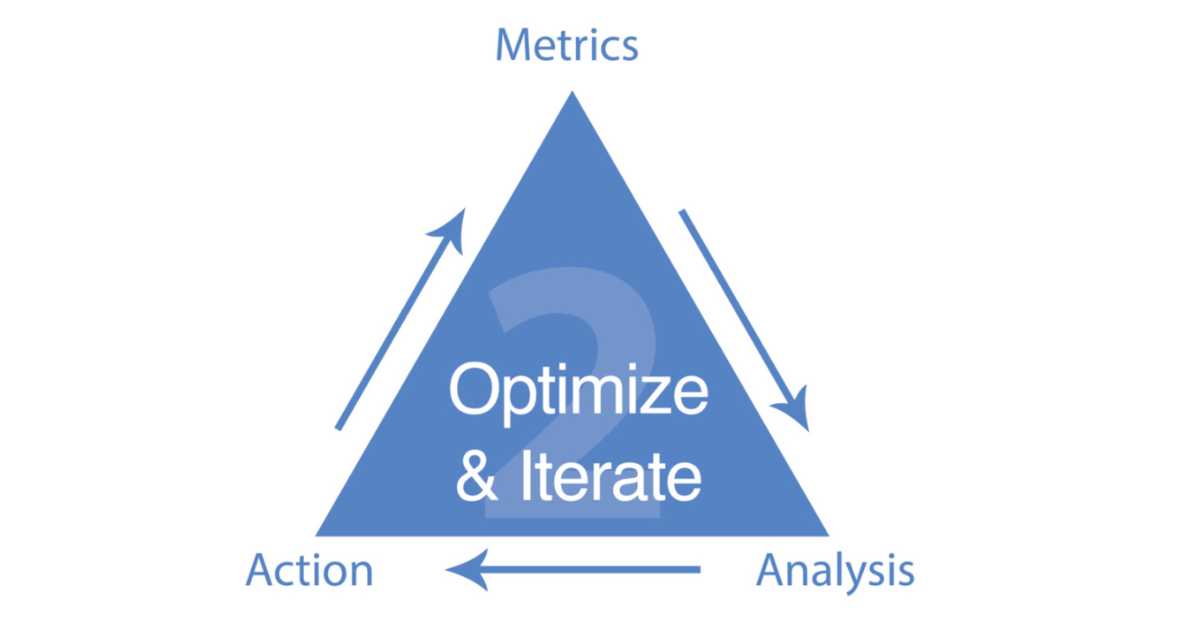
That’s where the MAA Framework comes in: Metrics → Analysis → Action.
Metrics: Track the data—sales, leads, traffic, clicks, conversions.
Analysis: Identify which pieces or pages drive those results.
Action: Double down on what’s working and cut what isn’t.
You should be able to trace every dollar of revenue back to the lead, the click, and ultimately the content that sparked it. That’s how you prove marketing is an investment, not a cost.
Want to Go Deeper?
If you’ve got a family business, a son or daughter helping with marketing, or team members you want trained the right way—send them to High Rise Academy.
Inside, we teach:
How to build and manage your SEO Tree
How to process real proof into ranked content
How to tie marketing directly to CRM, sales, and QuickBooks
They’ll learn to run your own Content Factory, turning every bit of real-world proof into revenue-producing content.
One of the fastest ways to destroy a local business’s visibility is by doing bad SEO. We recently saw this happen when a virtual assistant (VA) working on the Plumbing Proswebsite spent hundreds of hours creating content that looked productive on paper—but ended up tanking performance in search.
This case has become one of our favorite teaching examples at High Rise Influence because it highlights a problem that happens all the time: people chase SEO volume instead of real value.
The Problem: A VA Who Thought More Pages = More SEO
When Dylan Haugen and I audited the project, it seemed fine at first glance. Traffic was up. The domain rating was higher. Keyword counts had increased. But when we looked deeper, those metrics told a very different story.
The VA had spent weeks creating location service pages for every nearby town—Helertown, Bath, Nazareth, Wind Gap, and more. Each page used the same copy, just swapping the city name:
“Plumbing services in Wind Gap.” “Reliable plumbing in Wind Gap.” “Expert plumbing for Wind Gap homeowners.”
That pattern repeated dozens of times. No photos, no examples, no videos, no proof of actual work—just empty repetition.
Metrics: The site showed traffic, but not the right kind.
Analysis: Content was repetitive, low-quality, and off-target.
Action: Remove the filler, replace it with real examples and proof of work.
SEO doesn’t have to be complicated—it just has to be real.
What Every Young Marketer Should Learn
This case is a reminder that doing more work doesn’t mean doing better work. The VA wasn’t lazy; he just misunderstood what matters. SEO isn’t about making more pages—it’s about showing real experience.
When you build marketing around reality—actual projects, people, and results—you’re not just optimizing for Google. You’re building trust that lasts.
If you’re a young adult—or know one—who wants to learn how to apply strategies like this for real businesses, joinHigh Rise Academy. We teach hands-on, proven methods that turn real work into marketing that ranks and converts.
Every time someone tags me in Basecamp, I get two emails for the same message: one for the post, and one for the mention.
Multiply that by dozens of projects, and you’ve just doubled the noise in an inbox that already gets over a thousand emails a day.
I manage 1,000 emails a day. Every unnecessary ping pulls me away from the high-value work that keeps everything moving: strategy, client relationships, training, and developing the next generation of digital leaders.
Tagging me in Basecamp might seem like a quick way to get my attention, but it actually creates friction.
It breaks the system we built to keep communication smooth, focused, and accountable.
A = Accountable (the person ensuring it gets done).
C = Consulted (people giving input).
I = Informed (people who just need to know).
When you tag someone just to make sure they “saw it,” you’re bypassing that structure.
It’s like cutting across traffic because you don’t feel like waiting for the light; it might save a second, but it causes chaos.
We Built Systems for a Reason
We created the Level 1 Guide to make this process easy for new folks and anyone who hasn’t worked in a high-functioning team before. It’s all spelled out, who does what, where updates go, and how to communicate clearly without creating extra noise.
Following these systems is about protecting focus. Every time you skip the system, you create work for someone else and that ripple effect slows everyone down.
The Bottom Line
Don’t tag me in Basecamp. If I need to be looped in, assign the task to the right person and let the process work. If it’s truly urgent, use the proper channels.
We win by running clean systems, not by shouting louder in the digital hallway.
Congratulations, you’ve got your first client! That’s a huge milestone. But here’s the thing: the easiest time to keep a client happy is before they’re upset. Once things spin out of control, you’re in damage-control mode and that’s exhausting.
When you care early, communicate often, and follow the right process, you won’t have to “save” accounts. You’ll grow them.
Why Clients Stay: Results + Communication
Our clients don’t stay because of contracts. They stay because we drive real results, and they feel cared for.
Retention happens when you:
Deliver results consistently through the MAA process — Metrics → Analysis → Action.
Communicate clearly every week, no matter what.
We don’t hide behind a one-year lock-in. Clients stay with us because they want to, not because they have to.
The MAA Process (Metrics → Analysis → Action)
This isn’t just another framework or template; it’s a mindset. Every week, you’ll move through these three steps:
Metrics: Gather the numbers. What happened?
Analysis: What do the numbers mean?
Action: What will we do next?
It doesn’t matter whether you’re running Google Ads, Facebook, SEO, or content. The same process applies everywhere. Your goal? Drive more qualified phone calls that lead to real customers for your client.
The Power of the Friday Report
Every Friday (or Thursday if you’re ahead), send your optimization report. Even if you don’t have big changes to announce, your consistency shows you care.
Clients should never wonder, “What’s happening?” The moment they stop hearing from you, they assume you’ve stopped caring. And that’s the #1 reason clients leave, not bad performance, but lack of perceived care.
If you’re sick, traveling, or have weak Wi-Fi, still message them. Even a quick “Hey, I’ll send the update tomorrow, just want you to know I’m on it” goes a long way.
Handling the Unexpected
Stuff breaks, websites crash, ads stop running, Google updates happen. That’s life in digital marketing.
When things go sideways:
Don’t panic.
Triage. Figure out what matters most.
Communicate. Tell the client what’s happening and what you’re doing.
Most clients are understanding, especially compared to their last three agencies that ghosted them or sent useless, automated reports. When you care, analyze, and take action, you stand out instantly.
Learn Before You Lead
You’re part of a team now, and eventually, you’ll lead one. But before you manage others, master the process yourself.
Do the work first. Learn the system. Then, when your teammates get stuck, you’ll know how to guide them.
That’s how we grow.
Why Feedback is Gold
Weekly reports aren’t just for clients; they’re feedback loops for you.
Sometimes clients will say:
“This looks awesome, great job!”
Or even:
“Turn the marketing down, we’re booked out for two weeks!”
Other times, they’ll raise concerns. That’s fine too. It keeps communication alive and helps you improve faster than any course ever could.
Keep Optimizing
No one ever becomes “done learning.” Even the most experienced marketers keep refining how they use data and tools.
Treat every week like another rep in the gym, small, steady improvements that add up over time.
Remember: you don’t win by sprinting. You win by showing up consistently.
Final Thought
Client success isn’t about being a “guru.” It’s about being reliable, thoughtful, and proactive. Do what you say you’ll do, communicate clearly, and improve week after week.
That’s how you build a career. That’s how you make clients stay. And that’s how you win, one Friday report at a time.