How We Built a Grokipedia SEO Tree for David Meerman Scott’s Books

At High Rise Influence, we’ve been focused on building structured entity pages inside Grokipedia instead of relying on a single profile page.

Rather than creating one main entry and stopping there, the goal is to develop a connected system around the people and properties they control.

Our work with David Meerman Scott is a clear example of how this works.

David is a well-known marketing author with multiple bestselling books. His main Grokipedia page already covered his background, career, and major accomplishments. Under the publications section, his books were listed, but mostly as a simple collection of titles with limited detail.

We saw an opportunity to expand that into something stronger.

From a Bullet List to Individual Book Pages

Instead of leaving the books as short mentions under his primary page, the plan was to:

  • Create a dedicated Grokipedia page for each book
  • Add structured, factual descriptions
  • Interlink each book page with David’s main profile

This creates what we call an SEO tree:

  • The main entity page (David Meerman Scott)
  • Supporting entity pages (each individual book)
  • Internal links connecting them both ways

That structure strengthens topical authority and makes the relationships between entities much clearer.

How We Created the Book Entries

David has a books page on his website listing all of his publications. We used that as the starting point.

From there, we generated structured summaries for each book. The key was staying neutral and encyclopedic—not promotional.

Each book entry included:

  • The full title and author
  • Publication history (original release year, later editions, updates)
  • Notable impact (international bestseller status, industry influence, longevity)
  • A factual summary of the book’s core themes
  • A short rationale explaining why the book deserves its own entry

That final section is critical.

You’re not trying to sell the book. You’re documenting why it is notable.

For example, with The New Rules of Marketing & PR, the rationale focused on:

  • Its role as David’s flagship book
  • Its influence on content-driven, buyer-centric marketing
  • Its multiple editions and long-term relevance

That establishes importance without sounding like marketing copy.

Handling Edit Requests vs. New Page Creation

A common issue you’ll run into: instead of creating a new book page, Grokipedia may submit your content as an edit to the main author page.

This often expands the book section under the primary profile, which improves depth.

However, if your goal is to build a true SEO tree, you still want standalone pages.

That’s where your rationale matters. If Grokipedia already mentions the book within the author’s page, you may need to resubmit and clarify why a dedicated entry is justified.

In our case, some books required multiple submissions before individual pages were approved.

Organizing the Process

To stay organized, we tracked:

  • The generated summary
  • Whether it was submitted
  • Whether it was approved
  • The final live URL once published

Once individual book pages were live, we returned to David’s main Grokipedia page and submitted another edit request to:

  • Interlink the book title to its dedicated page

It’s important to use the word “interlink” so it’s clear the link stays within Grokipedia rather than pointing externally.

Then we went to each book page and requested:

  • Interlink back to David Meerman Scott’s main page

Now the structure looks like this:

David Meerman Scott (main page)

Individual book pages (each linking back to him)

That internal authority loop strengthens the relationship between the person and the properties he controls.

Why This Structure Matters

Grokipedia has solid domain authority. Internal links from structured entity pages can contribute to search visibility and credibility.

More importantly, this mirrors how knowledge systems are structured:

  • A person
  • Their companies
  • Their books
  • Their projects

Each gets its own documented page, and everything connects logically.

That’s far stronger than a single static profile.

Applying This to Your Own Brand or Clients

If you or your client:

  • Wrote books
  • Founded companies
  • Created podcasts
  • Built organizations

Each of those entities should have its own page, properly documented and interlinked.

The basic process:

  1. Write a neutral, factual summary
  2. Include publication history and impact
  3. Provide a clear notability rationale
  4. Submit the article
  5. Interlink it with the main entity page

Over time, this builds a structured footprint instead of a single isolated entry.

Final Thoughts

Grokipedia is still early in its growth cycle, which means there is real opportunity to establish structured entity presence now.

The key is staying factual, organized, and intentional about internal linking.

At High Rise Influence, we’re continuing to build this structure not just for David Meerman Scott, but across our network, ensuring that every meaningful entity has its own documented page and that all related properties connect in a clear authority chain.

If you want long-term credibility, think in systems, not single pages.
How To Create And Manage Grokipedia Pages For Clients

Grokipedia (by xAI) is an encyclopedia-style platform similar to Wikipedia, except it’s much easier to request new articles, suggest edits, and build connected entity pages for people, businesses, and brands. For client work, Grokipedia is a fast way to help a business owner build online credibility, connect their digital assets, and create a clean “entity footprint” that can support long-term trust online.

This SOP breaks down the exact process our team can follow to request Grokipedia pages for clients, get them approved, fix mistakes, and maintain them over time.

Why Grokipedia Pages Matter For Clients

A Grokipedia page becomes a central reference point that can connect the client to:

  • Their business entity
  • Their other related entities (podcasts, brands, associations, awards, etc.)
  • Other people in their network
  • Public sources across the internet

Unlike a standard blog post or landing page, Grokipedia pages are structured like a public encyclopedia entry. That matters because these pages are built to summarize “who the person is” or “what the business is” in a clean, structured way that aligns with how entity-based search and AI tools organize information.

Even when the first version isn’t perfect, the edit and revision process is simple enough that we can quickly refine it.

What To Create For Each Client (Required)

For every client, the goal is to create two separate pages, not just one

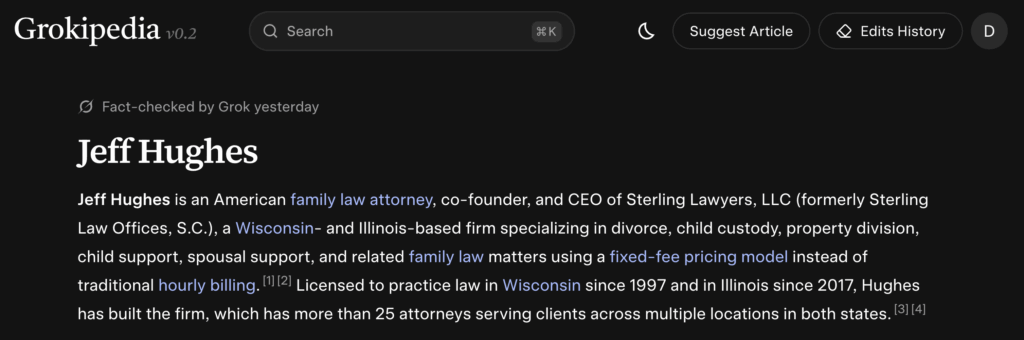
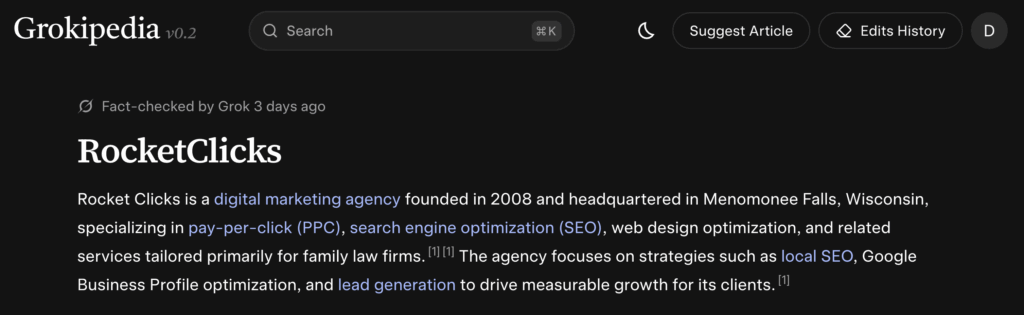
For example, we created a page for Jeff Hughes, as well as one of his businesses, Rocket Clicks.

1. The Client’s Personal Page

Example: the business owner, founder, doctor, attorney, etc.

Example of family law attorney Jeff Hughes’ page

2. The Company Page

Example: the client’s dental practice, law firm, home service business, agency, etc.

Example of Rocket Clicks’ page, one of Jeff’s companies

This matters because Grokipedia can sometimes confuse the business and the person if the request is framed incorrectly. Keeping them clearly separated increases the chances of approval and makes the pages more accurate.

Step 1: Check If The Page Already Exists

Before you suggest an article:

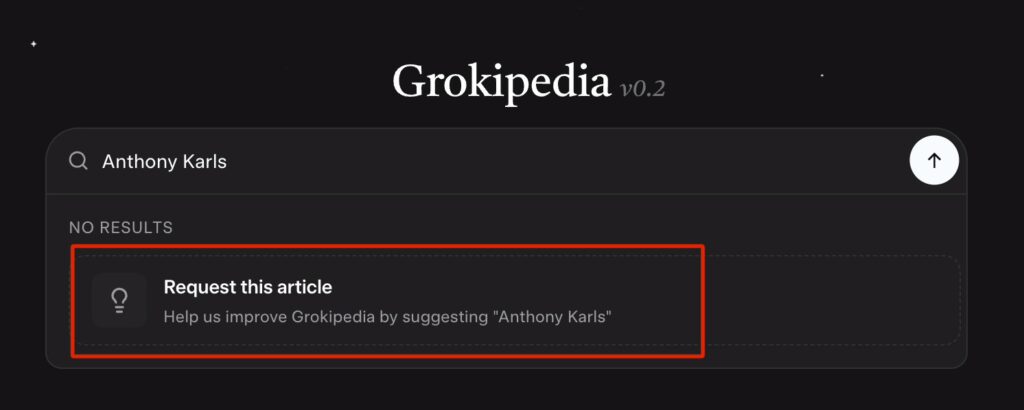
  • Search the client’s name inside Grokipedia
  • Search the business name inside Grokipedia
  • Confirm whether a page already exists for either one

Sometimes a page already exists without us needing to create it. If it does exist, we skip directly to the editing process.

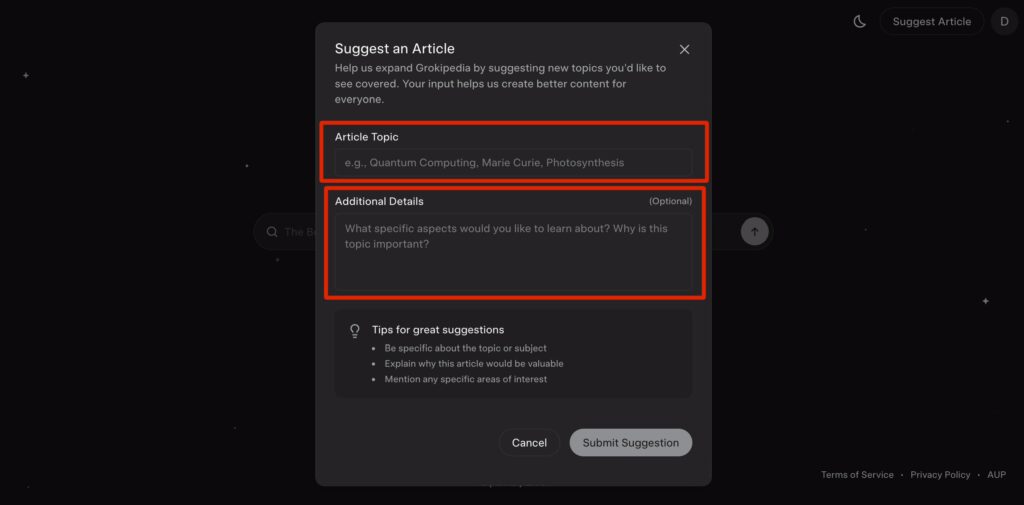
Step 2: Suggest A New Article

If the client does not have a page yet:

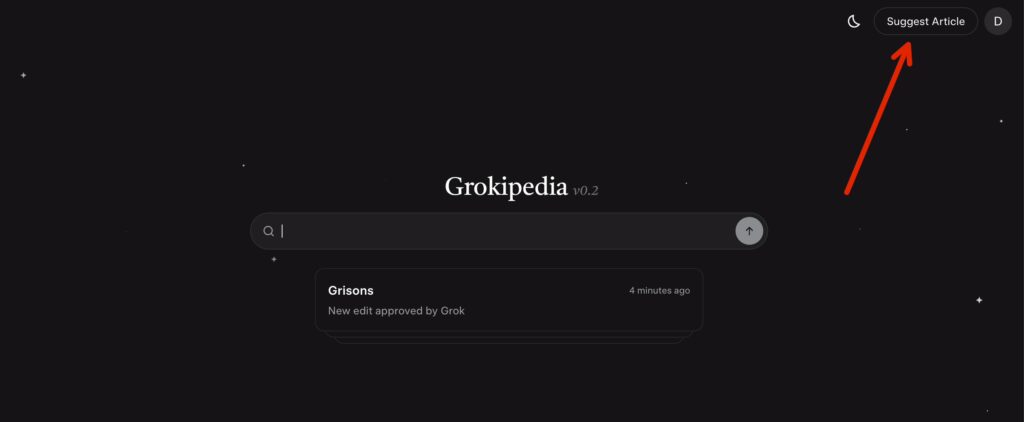
  1. Click “Suggest Article” (or request the article after searching their name)
  2. Enter the Article Topic
    • Use the client’s real name (first + last)
  3. Add Additional Details
    • This is where you guide Grokipedia to pull the right informationWhat To Include In “Additional Details”
Select “Suggest Article”
Enter article topic / additional details

Focus on facts Grokipedia can verify from public sources, such as:

  • Their job title and role
  • Their business name and location
  • Their specialty (dentist, attorney, contractor, etc.)
  • Known awards, leadership roles, or credentials
  • Public-facing projects (podcast appearances, published interviews, etc.)

Goal: Give Grokipedia the correct angle so it generates a page that matches how the client should be and wants to be represented online.

Step 3: Suggest The Business Article Separately

After the personal page is submitted (or approved), request the business page as its own entry.

Important Note: Avoid The Duplicate Rejection Problem

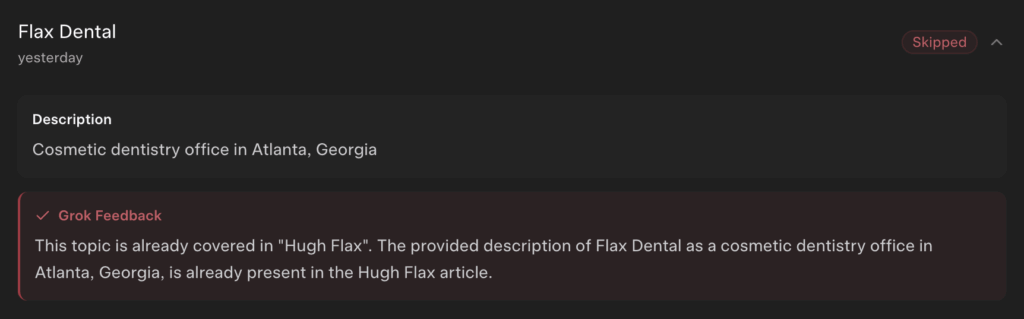
Sometimes Grokipedia blocks a business page if it believes it overlaps with the owner’s page.

If the business article gets flagged as a duplicate:

  • Don’t mention the owner’s name heavily in the business request
  • Focus on the business as its own entity:
    • what it does
    • where it operates
    • what it’s known for
    • what services it provides

This usually fixes the issue.

Step 4: Review The Page After It Goes Live

Once Grokipedia accepts the request and generates the page, read it carefully.

You’re looking for:

  • Wrong dates
  • Incorrect job titles
  • Wrong location
  • Missing business name
  • Broken links to related entities
  • Mentions that should connect to other pages but don’t
  • Anything incorrect / non-factual

This step matters because Grokipedia is generating content by scraping the internet, which means it will occasionally pull incorrect info, misunderstand context, or mix in results from other people with the same name.

Step 5: Fix Incorrect Information With “Suggest Edit”

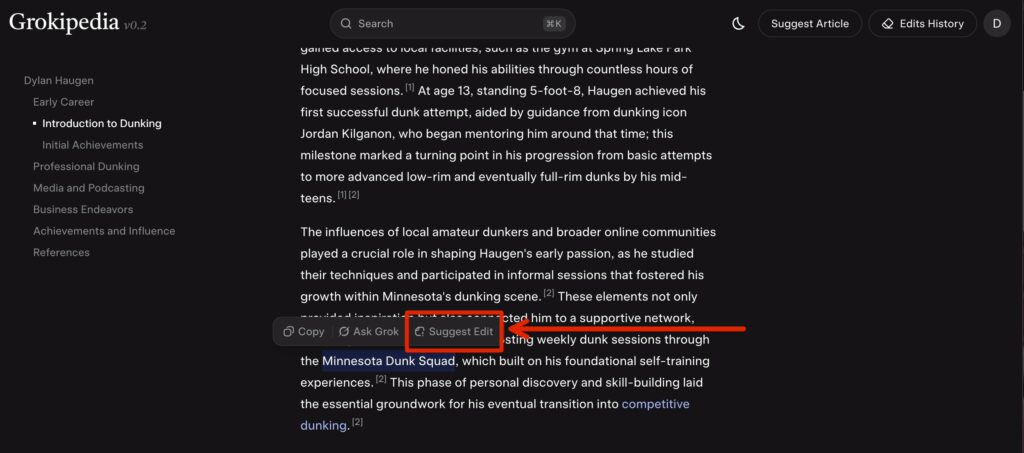
To fix something:

  1. Highlight or locate the incorrect line
  2. Click “Suggest Edit”
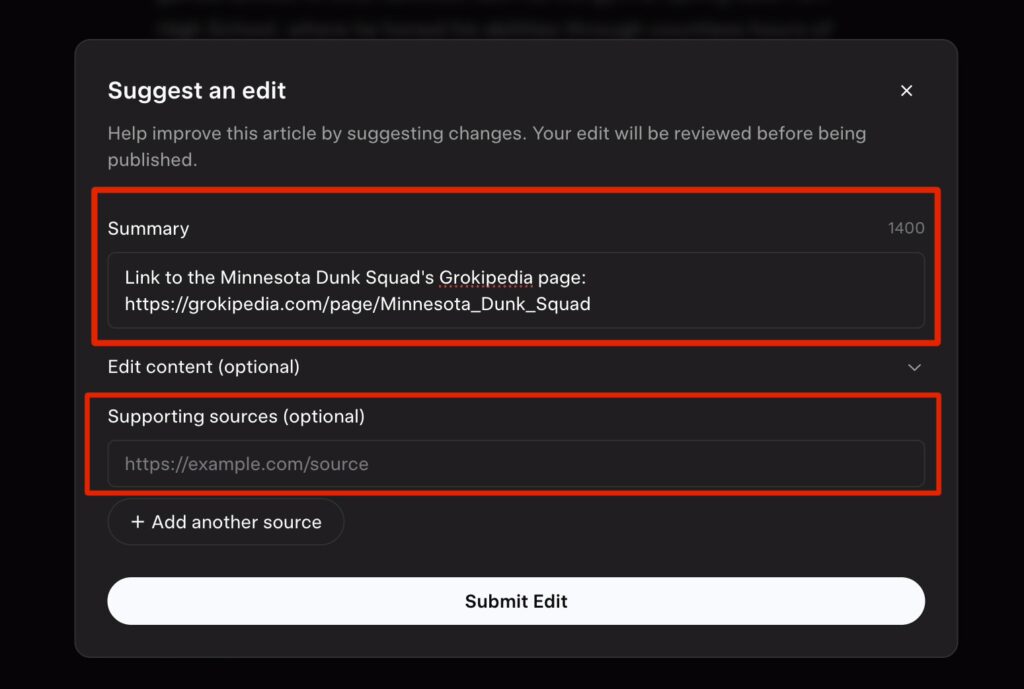
  3. Explain the correction clearly and simply (include verifiable sources, if applicable)
  4. Submit the edit
Select over the text you believe needs edited, then select “Suggest Edit”
Add summary of the edits that are needed, include supporting sources / URLs

Common Client Fixes

  • Correcting dates (events, awards, launches, etc.)
  • Clarifying job roles (owner vs associate, founder vs employee, etc.)
  • Fixing spelling of names or business names
  • Cleaning up descriptions that feel inaccurate or unclear

If your edit gets rejected due to lack of proof, it means the internet sources Grokipedia found didn’t support your change yet.

In that case, you have two options:

  • Find a stronger public source for the correct info
  • Publish a source yourself (website page, article, podcast mention, etc.) and retry later

Step 6: Improve Entity Linking (Huge Benefit)

One of the most valuable parts of Grokipedia is how it interlinks entities.

Even if the article content is fine, it might miss obvious links such as:

  • client → business page
  • client → podcast page
  • client → award / association page
  • business → founder page

How To Fix Linking Issues

If you see a company name mentioned but not linked:

  1. Click Suggest Edit
  2. Request that the term becomes a hyperlink to the correct Grokipedia page
  3. Submit

This is one of the easiest edits to get accepted because it’s not changing facts—just improving structure.

Step 7: Track Your Submissions And Results

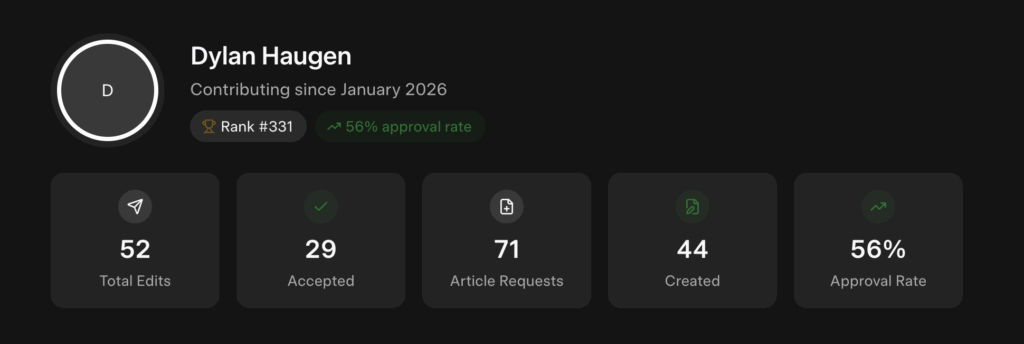
Use the Grokipedia Activity/Statistics section to monitor:

  • Your suggested articles
  • Your edits
  • Approval rate
  • Rejections (and reasons)

This helps you learn patterns quickly, because Grokipedia has guidelines on notability and evidence—similar to Wikipedia, but easier to work with.

Common Rejection Reasons (And What To Do)

1. “Not Notable Enough”

This can happen if the entity has very little coverage online.

Fix: Build more digital proof first:

  • podcast appearances
  • client site content
  • interviews and articles
  • awards and associations

2. “Not Enough Sources”

This happens when Grokipedia can’t find enough trustworthy info across the web.

Fix: Create more public sources, then re-submit.

Writing an article honoring someone can further strengthen their Grokipedia page. It publicly recognizes their impact while creating another trusted source Grokipedia can reference for context and credibility.

3. “Duplicate / Already Being Processed”

This is common when creating a business page that overlaps heavily with the owner’s page.

Fix: Rewrite the request so the business stands alone as an entity.

How To Deliver This To Clients (Simple Template)

Once the page is live, send it to the client inside Basecamp (or if you’re not on our team, whatever client communication tool you use):

Message Template:

Hey [Client Name] — great news! We just got your Grokipedia page published. Here’s the link: [paste link]

If you notice anything that needs to be updated (details, dates, links, etc.), send it to me and I can suggest edits, or you can request edits directly on the page as well.

Summary Checklist

For each client:

  • Search client name to check for an existing page
  • Request a personal Grokipedia page if missing
  • Request a business Grokipedia page separately
  • Review the published article for accuracy
  • Suggest edits for wrong info
  • Suggest edits to improve entity linking
  • Share the final link with the client
  • Track approvals and rejections in Activity/Stats